
Ekstensi KASKOW kini resmi di Chrome Web Store — pasang sekali klik, update otomatisThe KASKOW extension is now official on the Chrome Web Store — one-click install, automatic updates
Tak perlu lagi unduh ZIP dan mode pengembang: pasang KASKOW dari Chrome Web Store, dan Chrome memperbaruinya otomatis. Pengguna versi ZIP bisa pindah dalam 2 menit tanpa kehilangan data.
No more ZIP downloads or developer mode: install KASKOW from the Chrome Web Store and Chrome keeps it updated. ZIP users can switch in 2 minutes without losing data.
Di halaman ini
Kabar baik untuk pengguna Shopee Scraper: ekstensi KASKOW kini resmi tersedia di Chrome Web Store dengan nama KASKOW: Riset Produk & Biaya Penjual.
Yang jadi lebih mudah
- Pasang beberapa klik — klik Tambahkan ke Chrome, selesai. Tidak perlu mengunduh ZIP, mengekstrak, atau menyalakan mode pengembang.
- Selalu versi terbaru — Chrome memperbarui KASKOW otomatis di latar belakang. Tidak perlu lagi mengunduh dan menimpa folder.
- Tidak ada lagi peringatan mode pengembang dari Chrome.
- Ekstensi resmi yang sudah ditinjau Google.
Cara pasang
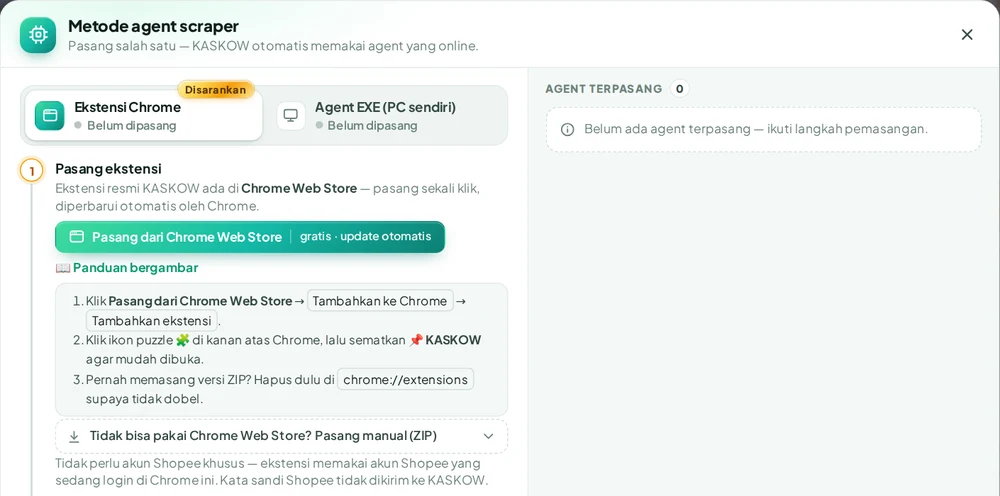
- Buka halaman KASKOW di Chrome Web Store, atau klik Pasang dari Chrome Web Store di menu Metode agent halaman Shopee Scraper.
- Klik Tambahkan ke Chrome → Tambahkan ekstensi.
- Klik ikon K KASKOW di toolbar dan masuk dengan akun KASKOW Anda.
Panduan bergambar lengkapnya ada di Cara pasang ekstensi KASKOW dari Chrome Web Store.
Sudah memakai versi ZIP?
Pindah ke versi Chrome Web Store supaya pembaruan berjalan otomatis:
- Buka
chrome://extensions, cari kartu KASKOW yang bertanda Unpacked / Dibongkar, klik Hapus (Remove). - Pasang dari Chrome Web Store seperti di atas, lalu masuk lagi dengan akun yang sama.
Data riset, Monitoring, dan langganan Anda tersimpan di akun KASKOW — tidak ada yang hilang saat pindah.
Tidak bisa memakai Chrome Web Store (misalnya komputer kantor yang dibatasi)? Cara pasang manual lewat ZIP tetap tersedia di menu Metode agent › Tidak bisa pakai Chrome Web Store?
Good news for Shopee Scraper users: the KASKOW extension is now officially on the Chrome Web Store as KASKOW: Riset Produk & Biaya Penjual.
What gets easier
- Install in a few clicks — click Add to Chrome and you're done. No downloading a ZIP, extracting it, or turning on developer mode.
- Always up to date — Chrome updates KASKOW automatically in the background. No more downloading and replacing folders.
- No more developer-mode warnings from Chrome.
- An official extension reviewed by Google.
How to install
- Open the KASKOW page on the Chrome Web Store, or click Pasang dari Chrome Web Store in the agent method menu on the Shopee Scraper page.
- Click Add to Chrome → Add extension.
- Click the K KASKOW icon in the toolbar and sign in with your KASKOW account.
The full illustrated guide: How to install the KASKOW extension from the Chrome Web Store.
Already using the ZIP version?
Switch to the Chrome Web Store version so updates happen automatically:
- Open
chrome://extensions, find the KASKOW card marked Unpacked, click Remove. - Install from the Chrome Web Store as above, then sign in again with the same account.
Your research data, Monitoring, and subscription live in your KASKOW account — nothing is lost when you switch.
Can't use the Chrome Web Store (e.g. a locked-down office computer)? Manual install via ZIP is still available under agent method › Tidak bisa pakai Chrome Web Store?