
Cara pasang ekstensi KASKOW manual lewat ZIP (panduan bergambar)How to install the KASKOW extension manually via ZIP (illustrated guide)
Untuk yang tidak bisa memakai Chrome Web Store: unduh ZIP, ekstrak, pasang di Chrome, masuk akun, sampai omset & terjual tampil di Shopee.
For those who can't use the Chrome Web Store: download the ZIP, extract, install in Chrome, sign in, and see revenue & sold counts on Shopee.
Di halaman ini
- Sebelum mulai
- Langkah 1: Buka menu pemasangan
- Langkah 2: Unduh ekstensi (ZIP)
- Langkah 3: Ekstrak file ZIP
- Langkah 4: Nyalakan Developer mode di Chrome
- Langkah 5: Klik Load unpacked lalu pilih folder
- Langkah 6: Pastikan ekstensi terpasang
- Langkah 7: Masuk ke akun KASKOW di ekstensi
- Langkah 8: Pastikan statusnya "Terhubung"
- Langkah 9: Coba riset di Shopee
- Langkah 10: Cek di halaman Shopee Scraper
- Memperbarui ekstensi ke versi baru
- Kalau ada kendala
- Pertanyaan umum
- Butuh bantuan?
- Before you start
- Step 1: Open the install menu
- Step 2: Download the extension (ZIP)
- Step 3: Extract the ZIP file
- Step 4: Turn on Developer mode in Chrome
- Step 5: Click Load unpacked and choose the folder
- Step 6: Check that the extension is installed
- Step 7: Sign in to KASKOW in the extension
- Step 8: Make sure it says "Terhubung" (Connected)
- Step 9: Try research on Shopee
- Step 10: Check on the Shopee Scraper page
- Updating to a new version
- Troubleshooting
- FAQ
- Need help?
Sekarang ada cara yang lebih mudah: pasang ekstensi KASKOW dari Chrome Web Store — beberapa klik dan diperbarui otomatis. Lihat panduan Chrome Web Store. Panduan ZIP di bawah ini hanya untuk yang tidak bisa memakai Chrome Web Store.
Panduan ini menuntun Anda langkah demi langkah, lengkap dengan gambar, dari mengunduh ekstensi KASKOW sampai data omset & terjual tampil langsung di halaman Shopee. Cukup sekali pasang, sekitar 5–10 menit.
Gambar di panduan ini memakai data contoh. Nama toko dan angka di layar Anda akan berbeda. Tampilan Chrome bisa berbahasa Inggris atau Indonesia — di setiap langkah kami tulis kedua namanya.
Sebelum mulai
- Komputer atau laptop (Windows, Mac, atau Linux). Ekstensi tidak bisa dipasang di HP.
- Google Chrome (Microsoft Edge dan Brave juga bisa).
- Akun KASKOW dengan uji coba atau langganan Shopee Scraper yang aktif. Belum punya? Aktifkan dulu gratis 7 hari lewat Telegram.
- Akun Shopee yang sudah login di Chrome yang sama (cukup akun pembeli biasa).
Perlu akun Shopee khusus atau akun "dummy"? Tidak perlu. Ekstensi memakai akun Shopee yang sedang login di Chrome Anda. Kata sandi Shopee tidak pernah dikirim ke KASKOW. Kalau ingin lebih tenang, boleh memakai akun Shopee kedua (bukan akun toko utama) — fiturnya sama saja.
Langkah 1: Buka menu pemasangan
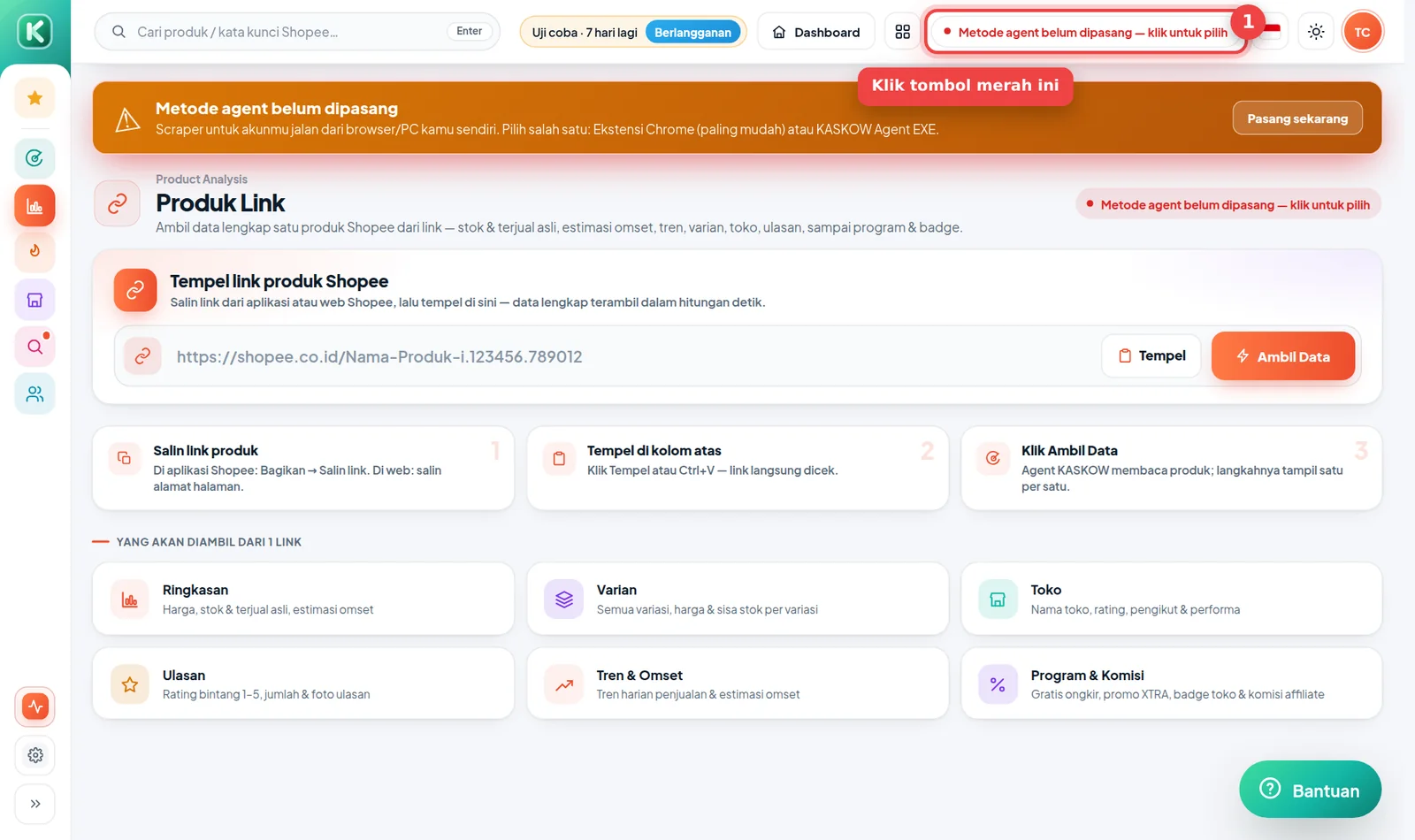
Masuk ke halaman Shopee Scraper, lalu klik tombol merah "Metode agent belum dipasang — klik untuk pilih" di bagian atas.
Langkah 2: Unduh ekstensi (ZIP)
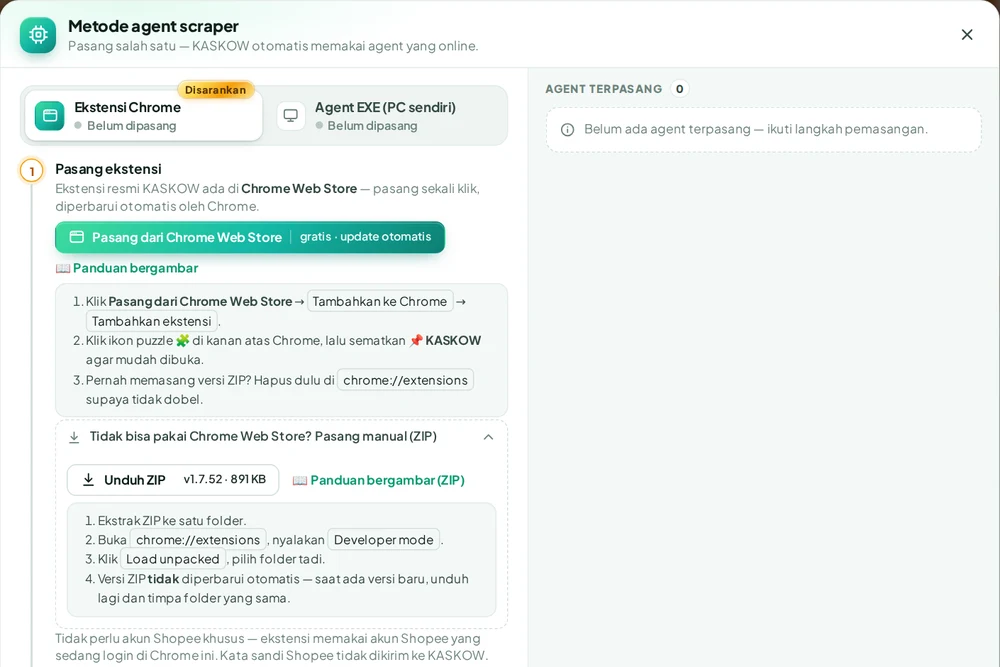
Jendela Metode agent scraper terbuka. Pastikan pilihan Ekstensi Chrome (Disarankan) yang aktif. Buka bagian Tidak bisa pakai Chrome Web Store? Pasang manual (ZIP), lalu klik Unduh ZIP. File KASKOW-Extension.zip tersimpan di folder Downloads.
Ukuran filenya kecil, biasanya selesai dalam hitungan detik. Kalau lambat atau gagal, coba klik lagi atau ganti jaringan (misalnya dari WiFi ke data HP).
Langkah 3: Ekstrak file ZIP
Chrome tidak bisa membaca file ZIP secara langsung, jadi ZIP-nya perlu dibuka (diekstrak) dulu:
- Buka folder Downloads.
- Windows: klik kanan KASKOW-Extension.zip → Extract All… (Ekstrak Semua) → Extract. Mac: klik dua kali file ZIP-nya.
- Akan muncul folder KASKOW-Extension. Di dalamnya ada file-file seperti
manifest.json,background.js, dan folderpopup. - Pindahkan folder KASKOW-Extension ke tempat yang tidak akan dihapus, misalnya folder Documents.
Jangan hapus folder ini setelah ekstensi terpasang. Chrome membaca ekstensi langsung dari folder tersebut — kalau folder dihapus atau dipindah, ekstensi berhenti bekerja.
Langkah 4: Nyalakan Developer mode di Chrome
- Di Chrome, ketik
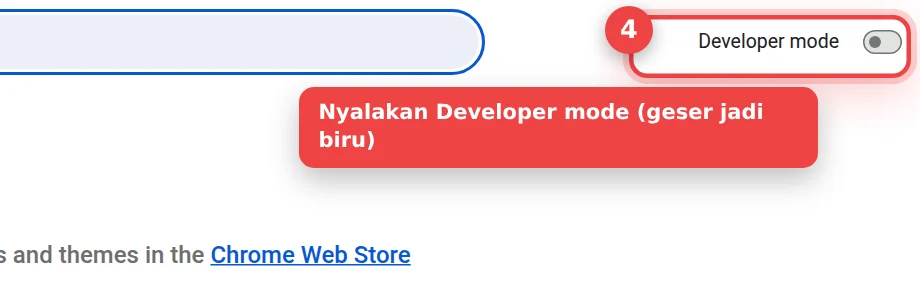
chrome://extensionsdi kolom alamat lalu tekan Enter. (Atau klik menu ⋮ → Extensions / Ekstensi → Manage Extensions / Kelola Ekstensi.) - Di pojok kanan atas, nyalakan sakelar Developer mode (Mode developer) sampai berwarna biru.
Memakai Microsoft Edge? Buka edge://extensions. Sakelar Developer mode ada di menu sebelah kiri.
Langkah 5: Klik Load unpacked lalu pilih folder
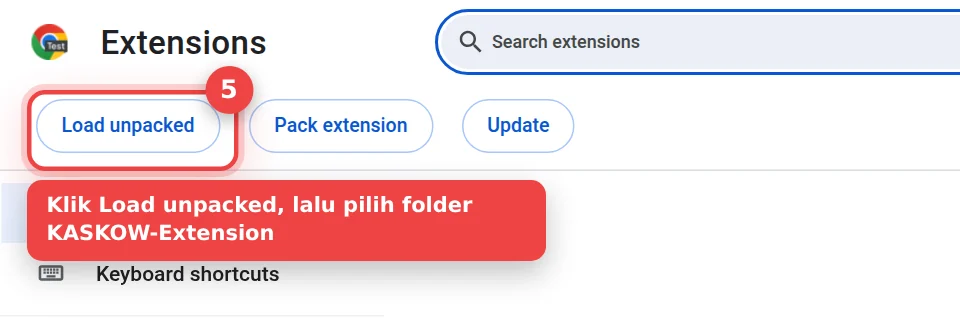
- Setelah Developer mode menyala, muncul tombol baru di kiri atas. Klik Load unpacked (Muat yang belum dibuka).
- Jendela pilih folder terbuka. Pilih folder KASKOW-Extension dari Langkah 3, lalu klik Select Folder / Pilih Folder.
Muncul pesan "Manifest file is missing or unreadable"? Artinya folder yang dipilih salah tingkat. Pilih folder yang langsung berisi file manifest.json — biasanya folder KASKOW-Extension yang ada di dalam folder hasil ekstrak.
Langkah 6: Pastikan ekstensi terpasang
Kartu KASKOW Riset Shopee muncul di halaman ekstensi dengan sakelar biru (menyala).
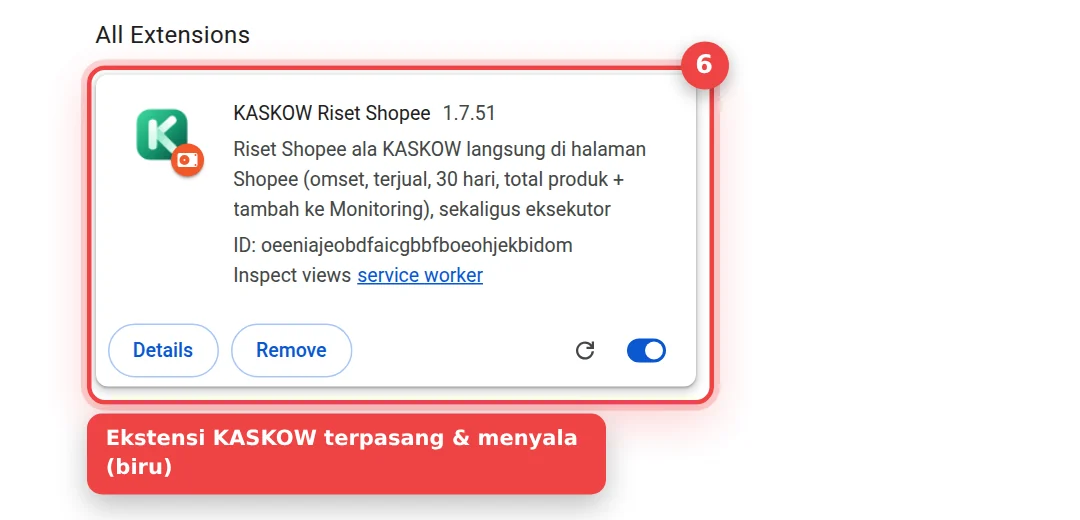
Supaya mudah dibuka, sematkan ikonnya di toolbar Chrome:
- Klik ikon puzzle 🧩 di kanan atas Chrome (sebelah kolom alamat).
- Cari KASKOW Riset Shopee, lalu klik ikon pin 📌 di sebelahnya.
- Ikon K hijau KASKOW kini selalu tampil di toolbar.
Langkah 7: Masuk ke akun KASKOW di ekstensi
Klik ikon K KASKOW di toolbar. Isi email atau username dan kata sandi akun KASKOW Anda, lalu klik Masuk.
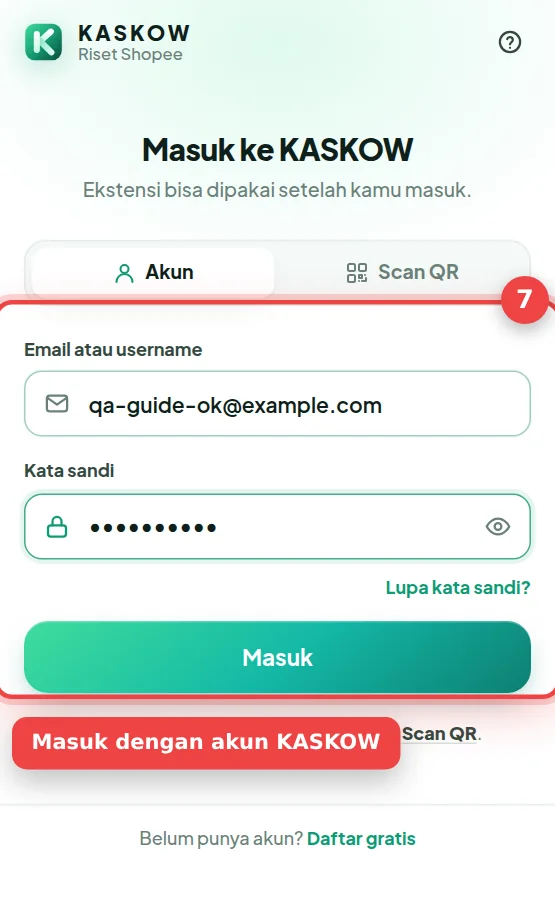
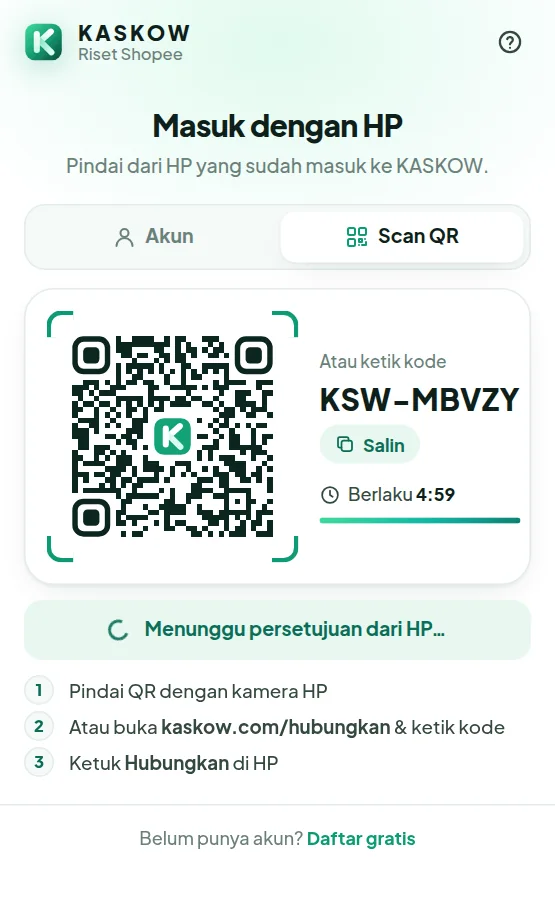
Daftar pakai Google (tidak punya kata sandi)? Pilih tab Scan QR, lalu pindai kodenya dengan kamera HP yang sudah login KASKOW dan ketuk Hubungkan. Bisa juga buka kaskow.com/hubungkan di HP dan ketik kodenya. Atau buat kata sandi dulu di Pengaturan › Keamanan › Buat kata sandi di kaskow.com, lalu masuk dengan email + kata sandi itu.
Langkah 8: Pastikan statusnya "Terhubung"
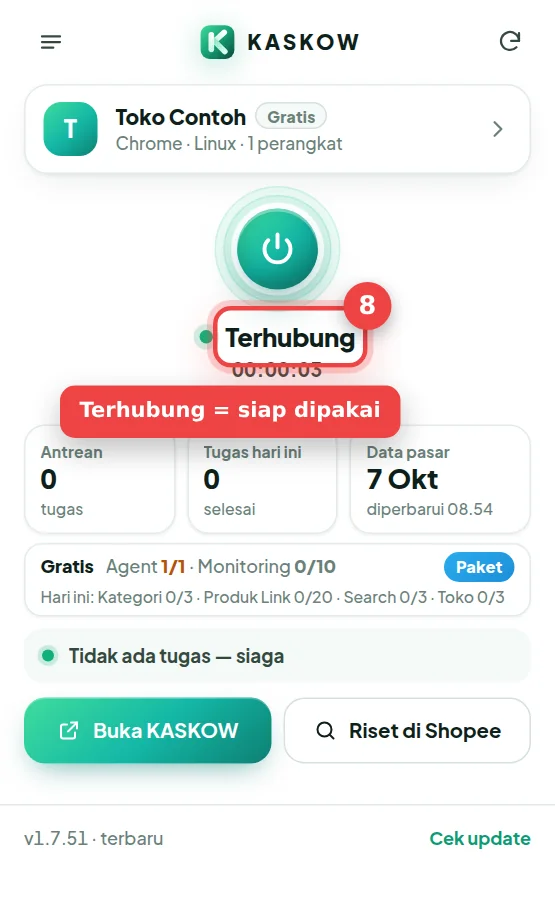
Setelah masuk, popup menampilkan nama akun Anda, paket yang aktif, dan status Terhubung dengan titik hijau. Artinya ekstensi sudah siap dipakai.
Langkah 9: Coba riset di Shopee
- Buka shopee.co.id dan pastikan Anda sudah login Shopee.
- Cari produk apa saja, misalnya panci.
- Di atas setiap produk muncul strip KASKOW berisi estimasi omset 30 hari dan jumlah terjual. Di bagian bawah layar ada ringkasan seluruh hasil pencarian.
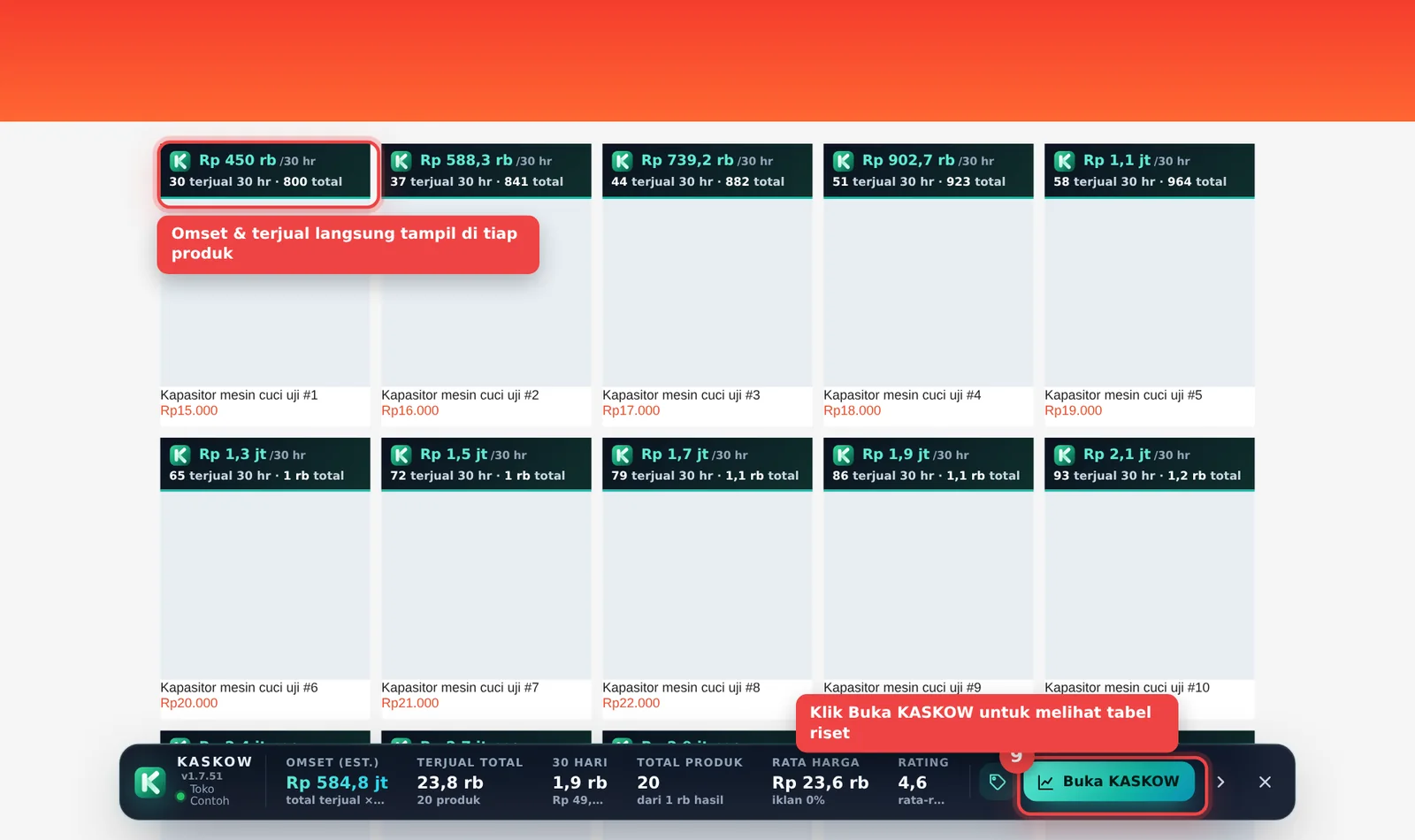
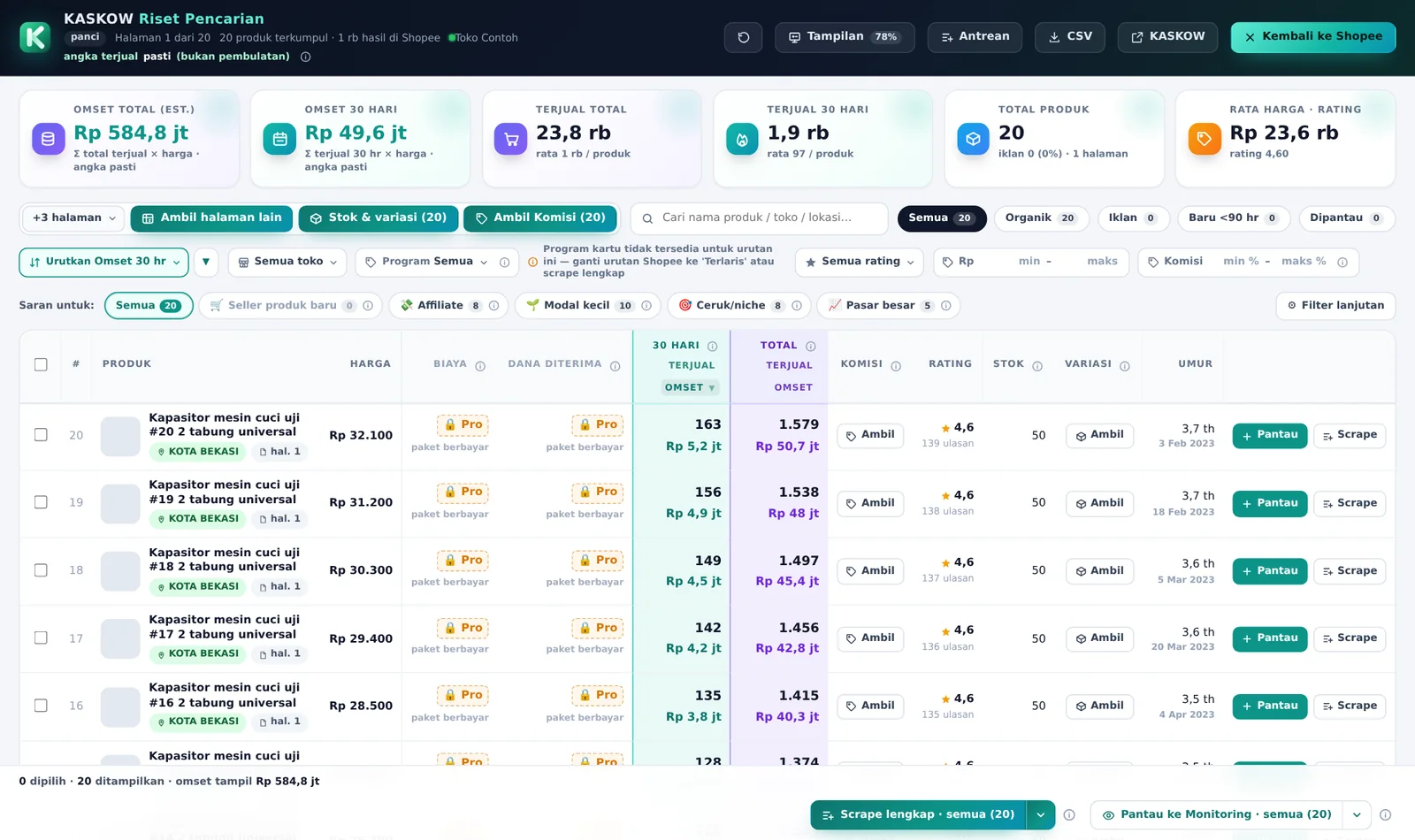
Klik Buka KASKOW di kanan bawah untuk melihat tabel riset lengkap: omset, terjual, stok, variasi, komisi, umur produk, dan lainnya. Dari sini Anda bisa langsung Pantau produk atau Scrape lebih detail.
Langkah 10: Cek di halaman Shopee Scraper
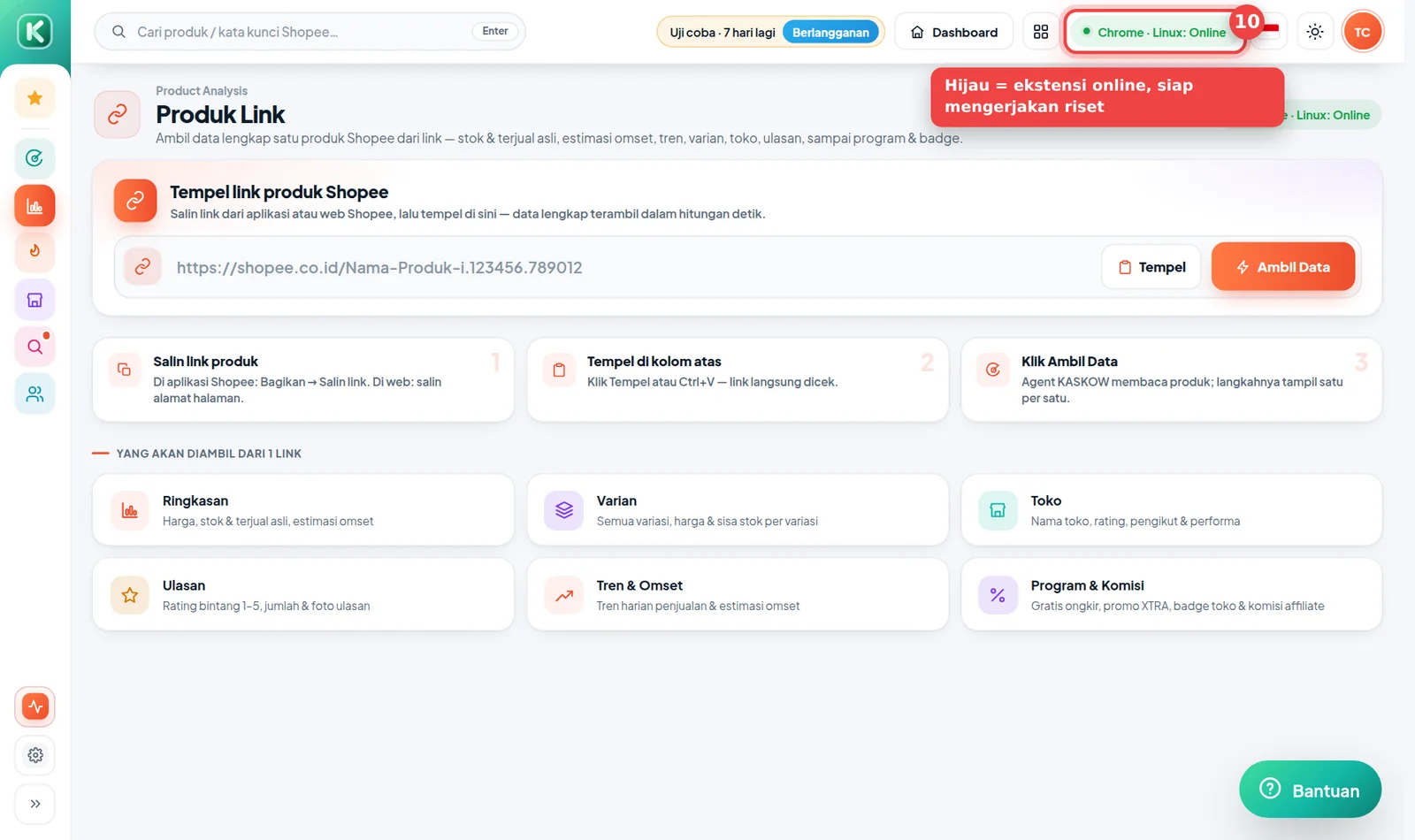
Kembali ke halaman Shopee Scraper. Tombol di atas kini hijau bertuliskan nama browser Anda, misalnya "Chrome · Windows: Online". Artinya agent siap mengerjakan riset dari menu Produk Link, Produk Search, Kategori, Toko Link, dan Monitoring.
Riset dikerjakan oleh Chrome Anda sendiri. Selama riset atau pembaruan Monitoring berjalan, biarkan Chrome tetap terbuka (boleh dikecilkan). Kalau Chrome ditutup, tugas menunggu sampai Chrome dibuka lagi.
Memperbarui ekstensi ke versi baru
Saat ada versi baru, popup ekstensi menampilkan pemberitahuan "Versi … tersedia":
- Klik Perbarui di popup — file ZIP baru terunduh.
- Ekstrak ZIP itu dan timpa folder KASKOW-Extension yang lama (pilih Replace / Ganti bila ditanya).
- Buka
chrome://extensionslalu klik ikon ⟳ (Muat ulang) di kartu KASKOW.
Akun Anda tetap masuk — tidak perlu login ulang.
Kalau ada kendala
| Masalah | Solusi |
|---|---|
| Unduhan lambat atau gagal | Klik Unduh ZIP sekali lagi, atau coba jaringan lain. Filenya hanya ±450 KB. |
| Tombol Load unpacked tidak ada | Developer mode belum menyala. Geser sakelarnya di kanan atas sampai biru (Langkah 4). |
| "Manifest file is missing or unreadable" | Folder yang dipilih salah. Pilih folder yang langsung berisi manifest.json (Langkah 5). |
| Chrome memunculkan peringatan "Disable developer mode extensions" | Klik × atau Batal, jangan klik Disable. Peringatan ini wajar untuk ekstensi yang dipasang dari folder. |
| Ekstensi hilang atau "error" setelah beberapa hari | Folder KASKOW-Extension terhapus atau dipindah. Ulangi dari Langkah 3 dan simpan foldernya di tempat tetap. |
| Popup meminta masuk terus | Masuk dengan akun KASKOW yang sama dengan yang dipakai di kaskow.com. Daftar pakai Google? Pakai tab Scan QR, atau buat kata sandi di Pengaturan › Keamanan. |
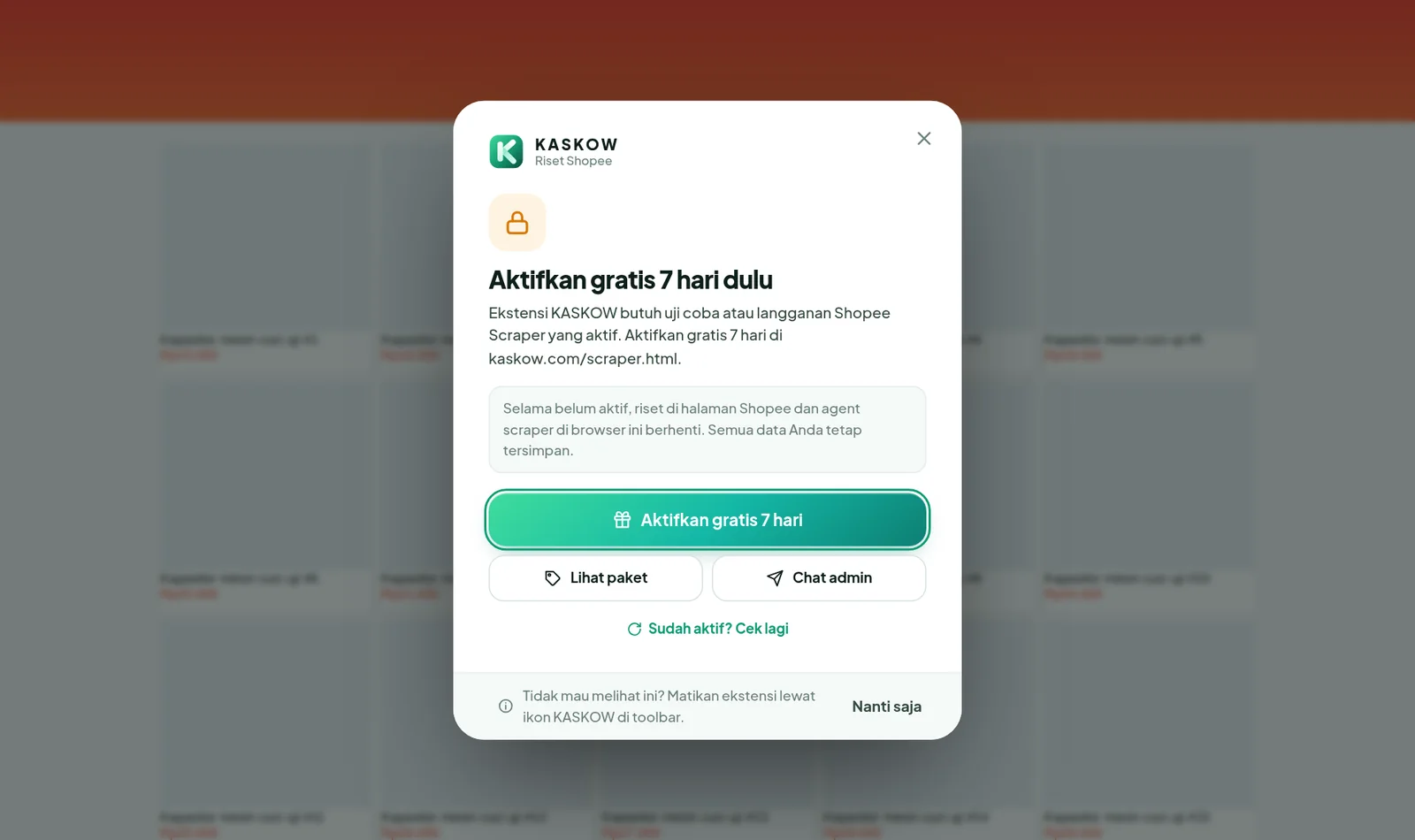
| Muncul layar "Langganan tidak aktif" | Uji coba atau langganan Anda belum aktif / sudah habis. Klik Aktifkan gratis 7 hari atau Lihat paket, lalu klik Sudah aktif? Cek lagi. |
| Angka omset tidak muncul di Shopee | Pastikan sudah login Shopee, muat ulang halaman (F5), dan pastikan sakelar Overlay di menu ☰ popup ekstensi menyala. |
| Shopee meminta verifikasi / captcha | Selesaikan verifikasinya seperti biasa di tab Shopee. Ekstensi otomatis melanjutkan tugas setelahnya. |
| Tombol di Shopee Scraper tetap merah | Pastikan Chrome terbuka dan popup ekstensi berstatus Terhubung. Klik ikon ⟳ di popup untuk menyegarkan. |
Pertanyaan umum
Apakah akun Shopee saya aman? Ya. Ekstensi hanya membaca data produk publik lewat browser Anda. Kata sandi Shopee tidak pernah dikirim ke KASKOW.
Bisa dipasang di HP? Tidak. Ekstensi butuh Chrome di komputer/laptop. Dari HP, Anda tetap bisa membuka hasil riset di kaskow.com.
Bisa dipasang di lebih dari satu komputer? Bisa. Jumlah komputer yang bekerja bersamaan mengikuti jumlah agent di paket Anda. Butuh lebih? Tambah slot agent dari menu profil di Shopee Scraper.
Harus login Shopee terus? Ya, selama memakai riset. Ekstensi memakai sesi Shopee yang sedang login di Chrome tersebut.
Butuh bantuan?
Chat admin KASKOW di Telegram @app_kaskow dan kirim screenshot layar Anda — kami bantu sampai berhasil.
Setelah ekstensi terpasang, lanjutkan ke: Riset produk dengan kata kunci · Membaca tabel hasil.
There's now an easier way: install KASKOW from the Chrome Web Store — a few clicks and automatic updates. See the Chrome Web Store guide. The ZIP guide below is only for those who can't use the Chrome Web Store.
This guide walks you step by step, with pictures, from downloading the KASKOW extension to seeing revenue & sold counts right on Shopee pages. You only install it once — about 5–10 minutes.
Pictures in this guide use sample data. Store names and numbers on your screen will differ. Chrome may be in English or Indonesian — we name both at each step.
Before you start
- A computer or laptop (Windows, Mac, or Linux). The extension can't be installed on a phone.
- Google Chrome (Microsoft Edge and Brave work too).
- A KASKOW account with an active Shopee Scraper trial or subscription. Don't have one? Activate the free 7-day trial via Telegram.
- A Shopee account signed in on the same Chrome (a normal buyer account is fine).
Do you need a special or "dummy" Shopee account? No. The extension uses the Shopee account signed in on your Chrome. Your Shopee password is never sent to KASKOW. If you prefer, you can use a second Shopee account (not your main store account) — features are the same.
Step 1: Open the install menu
Open the Shopee Scraper page and click the red "Metode agent belum dipasang — klik untuk pilih" button (agent method not installed) at the top.
Step 2: Download the extension (ZIP)
The Metode agent scraper window opens. Make sure Ekstensi Chrome (recommended) is selected. Open the Tidak bisa pakai Chrome Web Store? Pasang manual (ZIP) section (can't use the Chrome Web Store? manual install), then click Unduh ZIP. KASKOW-Extension.zip is saved to your Downloads folder.
The file is small and usually downloads in seconds. If it's slow or fails, click again or switch networks (e.g. WiFi to mobile data).
Step 3: Extract the ZIP file
Chrome can't read a ZIP file directly, so extract it first:
- Open your Downloads folder.
- Windows: right-click KASKOW-Extension.zip → Extract All… → Extract. Mac: double-click the ZIP file.
- A KASKOW-Extension folder appears, containing files like
manifest.json,background.jsand apopupfolder. - Move the KASKOW-Extension folder somewhere it won't be deleted, e.g. Documents.
Don't delete this folder after installing. Chrome loads the extension straight from it — if the folder is deleted or moved, the extension stops working.
Step 4: Turn on Developer mode in Chrome
- In Chrome, type
chrome://extensionsin the address bar and press Enter. (Or click the ⋮ menu → Extensions → Manage Extensions.) - In the top-right corner, switch on Developer mode until it turns blue.
Using Microsoft Edge? Open edge://extensions. The Developer mode switch is in the left menu.
Step 5: Click Load unpacked and choose the folder
- With Developer mode on, new buttons appear at the top left. Click Load unpacked.
- A folder picker opens. Choose the KASKOW-Extension folder from Step 3 and click Select Folder.
Seeing "Manifest file is missing or unreadable"? You picked the wrong folder level. Choose the folder that directly contains manifest.json — usually the KASKOW-Extension folder inside the extracted folder.
Step 6: Check that the extension is installed
The KASKOW Riset Shopee card appears with a blue (on) switch.
Pin the icon so it's easy to open:
- Click the puzzle 🧩 icon at the top right of Chrome (next to the address bar).
- Find KASKOW Riset Shopee and click the pin 📌 next to it.
- The green K KASKOW icon now always shows in the toolbar.
Step 7: Sign in to KASKOW in the extension
Click the K KASKOW icon in the toolbar. Enter your KASKOW email or username and password, then click Masuk (Sign in).
Signed up with Google (no password)? Choose the Scan QR tab, scan the code with a phone signed in to KASKOW and tap Hubungkan (Connect). You can also open kaskow.com/hubungkan on your phone and type the code. Or create a password first in Settings › Security › Create a password on kaskow.com, then sign in with your email and that password.
Step 8: Make sure it says "Terhubung" (Connected)
After signing in, the popup shows your account name, your active plan, and a Terhubung (Connected) status with a green dot. The extension is ready.
Step 9: Try research on Shopee
- Open shopee.co.id and make sure you're signed in to Shopee.
- Search for any product, e.g. panci.
- A KASKOW strip appears on every product with the estimated 30-day revenue and sold count. A summary of all results sits at the bottom of the screen.
Click Buka KASKOW (Open KASKOW) at the bottom right for the full research table: revenue, sold, stock, variants, commission, product age and more. From here you can Pantau (watch) products or Scrape them in detail.
Step 10: Check on the Shopee Scraper page
Go back to the Shopee Scraper page. The top button is now green with your browser's name, e.g. "Chrome · Windows: Online". The agent is ready to run research from Product Link, Product Search, Category, Store Link and Monitoring.
Research runs on your own Chrome. While research or Monitoring updates are running, keep Chrome open (minimizing is fine). If Chrome is closed, tasks wait until it's opened again.
Updating to a new version
When a new version is out, the extension popup shows "Versi … tersedia" (version available):
- Click Perbarui (Update) in the popup — the new ZIP downloads.
- Extract it and replace the old KASKOW-Extension folder (choose Replace if asked).
- Open
chrome://extensionsand click the ⟳ (Reload) icon on the KASKOW card.
You stay signed in — no need to sign in again.
Troubleshooting
| Problem | Fix |
|---|---|
| Download is slow or fails | Click Unduh ekstensi again or try another network. The file is only ~450 KB. |
| No Load unpacked button | Developer mode is off. Switch it on at the top right until it's blue (Step 4). |
| "Manifest file is missing or unreadable" | Wrong folder. Choose the folder that directly contains manifest.json (Step 5). |
| Chrome warns "Disable developer mode extensions" | Click × or Cancel — don't click Disable. This warning is normal for extensions loaded from a folder. |
| Extension disappears or shows "error" after a few days | The KASKOW-Extension folder was deleted or moved. Repeat from Step 3 and keep the folder in a fixed place. |
| The popup keeps asking to sign in | Use the same KASKOW account as on kaskow.com. Signed up with Google? Use the Scan QR tab, or create a password in Settings › Security. |
| A "Langganan tidak aktif" (subscription not active) screen appears | Your trial or subscription isn't active or has ended. Click Aktifkan gratis 7 hari (activate free 7 days) or Lihat paket (see plans), then Sudah aktif? Cek lagi (check again). |
| Revenue doesn't show on Shopee | Make sure you're signed in to Shopee, reload the page (F5), and check the Overlay di halaman Shopee switch in the popup's ☰ menu is on. |
| Shopee asks for verification / captcha | Complete it as usual in the Shopee tab. The extension continues automatically afterwards. |
| The Shopee Scraper button stays red | Make sure Chrome is open and the popup says Terhubung. Click ⟳ in the popup to refresh. |
FAQ
Is my Shopee account safe? Yes. The extension only reads public product data through your browser. Your Shopee password is never sent to KASKOW.
Can I install it on a phone? No. The extension needs Chrome on a computer. You can still view research results on kaskow.com from your phone.
Can I install it on more than one computer? Yes. How many computers work at once follows the number of agents in your plan. Need more? Add agent slots from the profile menu in Shopee Scraper.
Do I need to stay signed in to Shopee? Yes, while researching. The extension uses the Shopee session signed in on that Chrome.
Need help?
Chat with the KASKOW admin on Telegram @app_kaskow and send a screenshot — we'll help until it works.
Once installed, continue with: Research products by keyword · Reading the results table.