
Cara pasang ekstensi KASKOW dari Chrome Web Store (panduan bergambar)How to install the KASKOW extension from the Chrome Web Store (illustrated guide)
Beberapa klik dari Chrome Web Store sampai omset & terjual tampil di Shopee — tanpa ZIP, tanpa mode pengembang, dan diperbarui otomatis.
A few clicks from the Chrome Web Store to revenue & sold counts on Shopee — no ZIP, no developer mode, automatic updates.
Di halaman ini
Ekstensi KASKOW kini tersedia resmi di Chrome Web Store. Memasangnya cukup beberapa klik — tanpa mengunduh file, tanpa mengekstrak ZIP, dan tanpa mode pengembang. Versi baru juga terpasang otomatis oleh Chrome.
Gambar di panduan ini memakai data contoh. Tampilan Chrome bisa berbahasa Indonesia atau Inggris — di setiap langkah kami tulis kedua namanya.
Sebelum mulai
- Komputer atau laptop dengan Google Chrome (Microsoft Edge dan Brave juga bisa memasang dari Chrome Web Store).
- Akun KASKOW dengan uji coba atau langganan Shopee Scraper yang aktif. Belum punya? Aktifkan dulu gratis 7 hari lewat Telegram.
- Akun Shopee yang sudah login di Chrome yang sama (cukup akun pembeli biasa).
Pernah memasang KASKOW dari file ZIP? Hapus dulu versi lamanya: buka chrome://extensions, cari kartu KASKOW, klik Hapus (Remove). Dengan begitu tidak ada dua ekstensi KASKOW yang berjalan bersamaan.
Langkah 1: Buka menu pemasangan
Masuk ke halaman Shopee Scraper, lalu klik tombol Metode agent di bagian atas. Pada pilihan Ekstensi Chrome, klik tombol hijau Pasang dari Chrome Web Store.
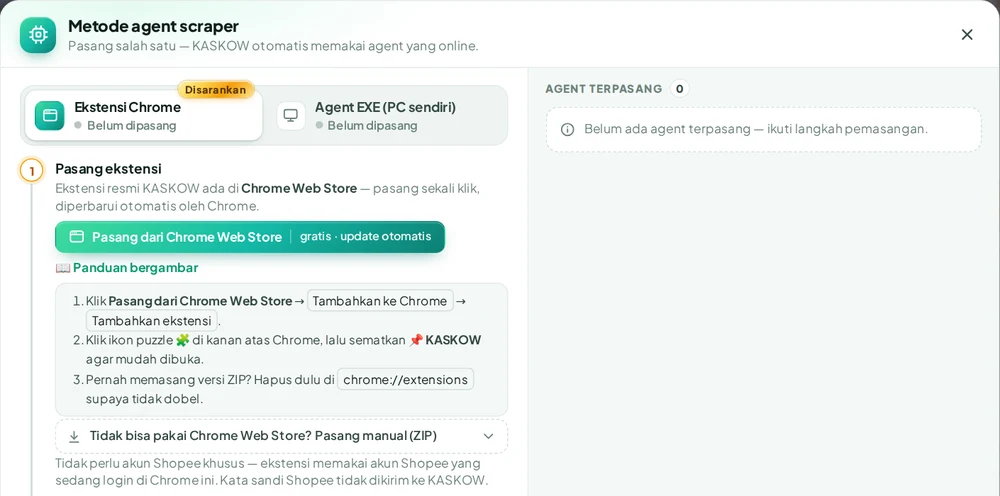
Bisa juga langsung membuka halaman KASKOW di Chrome Web Store.
Langkah 2: Tambahkan ke Chrome
Halaman Chrome Web Store terbuka. Pastikan namanya KASKOW: Riset Produk & Biaya Penjual dari kaskow.com, lalu klik tombol biru Tambahkan ke Chrome (Add to Chrome) di kanan atas.
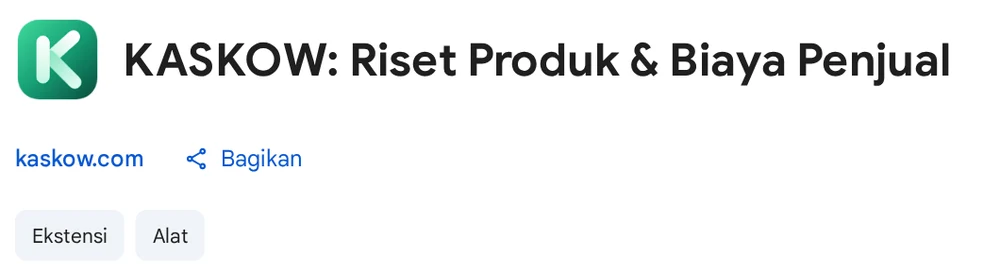
Chrome menampilkan jendela konfirmasi berisi izin ekstensi. Klik Tambahkan ekstensi (Add extension). Dalam beberapa detik muncul pemberitahuan bahwa KASKOW sudah ditambahkan.
Langkah 3: Sematkan ikon KASKOW
- Klik ikon puzzle 🧩 (Ekstensi) di kanan atas Chrome.
- Cari KASKOW: Riset Produk & Biaya Penjual, lalu klik ikon pin 📌 di sebelahnya.
- Ikon K hijau KASKOW kini selalu tampil di toolbar.
Langkah 4: Masuk ke akun KASKOW
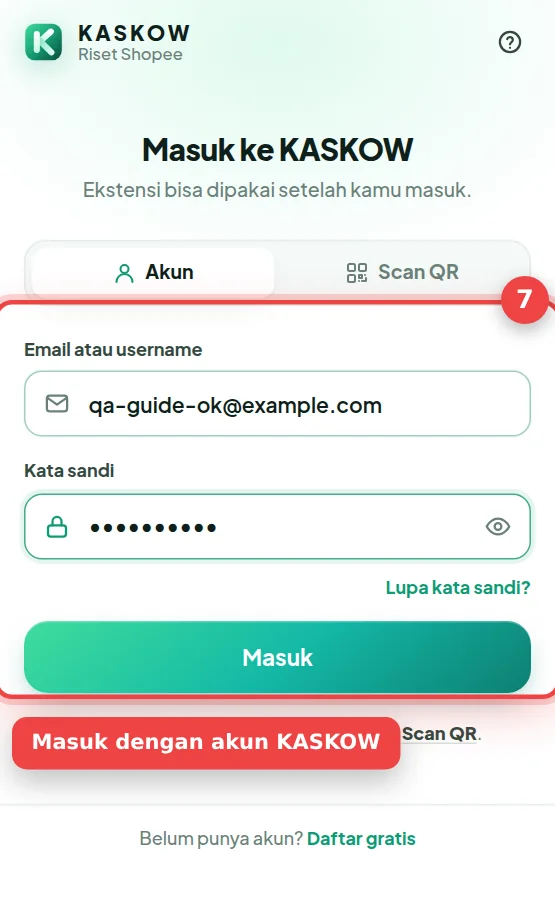
Klik ikon K KASKOW di toolbar. Isi email atau username dan kata sandi akun KASKOW, lalu klik Masuk.
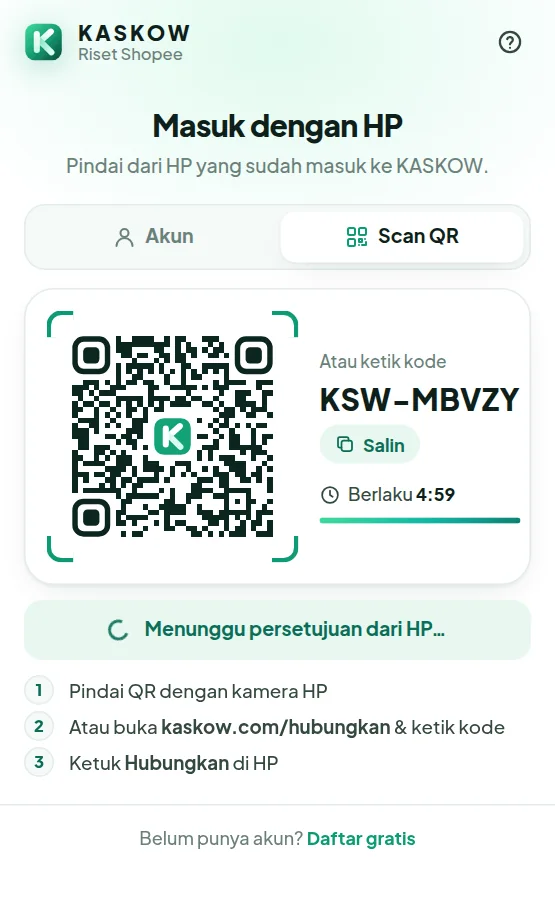
Daftar pakai Google (tidak punya kata sandi)? Pilih tab Scan QR, pindai kodenya dengan HP yang sudah login KASKOW, lalu ketuk Hubungkan.
Langkah 5: Pastikan "Terhubung"
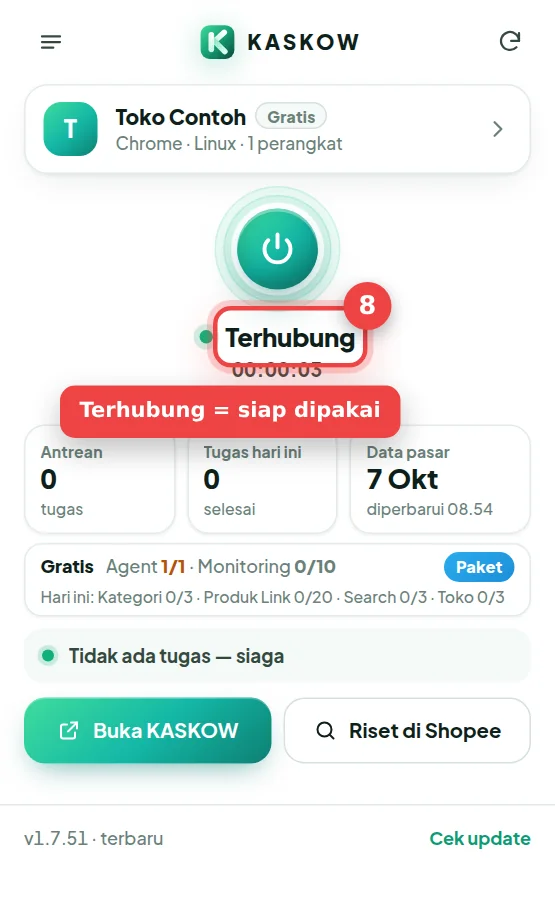
Popup menampilkan nama akun, paket yang aktif, dan status Terhubung dengan titik hijau.
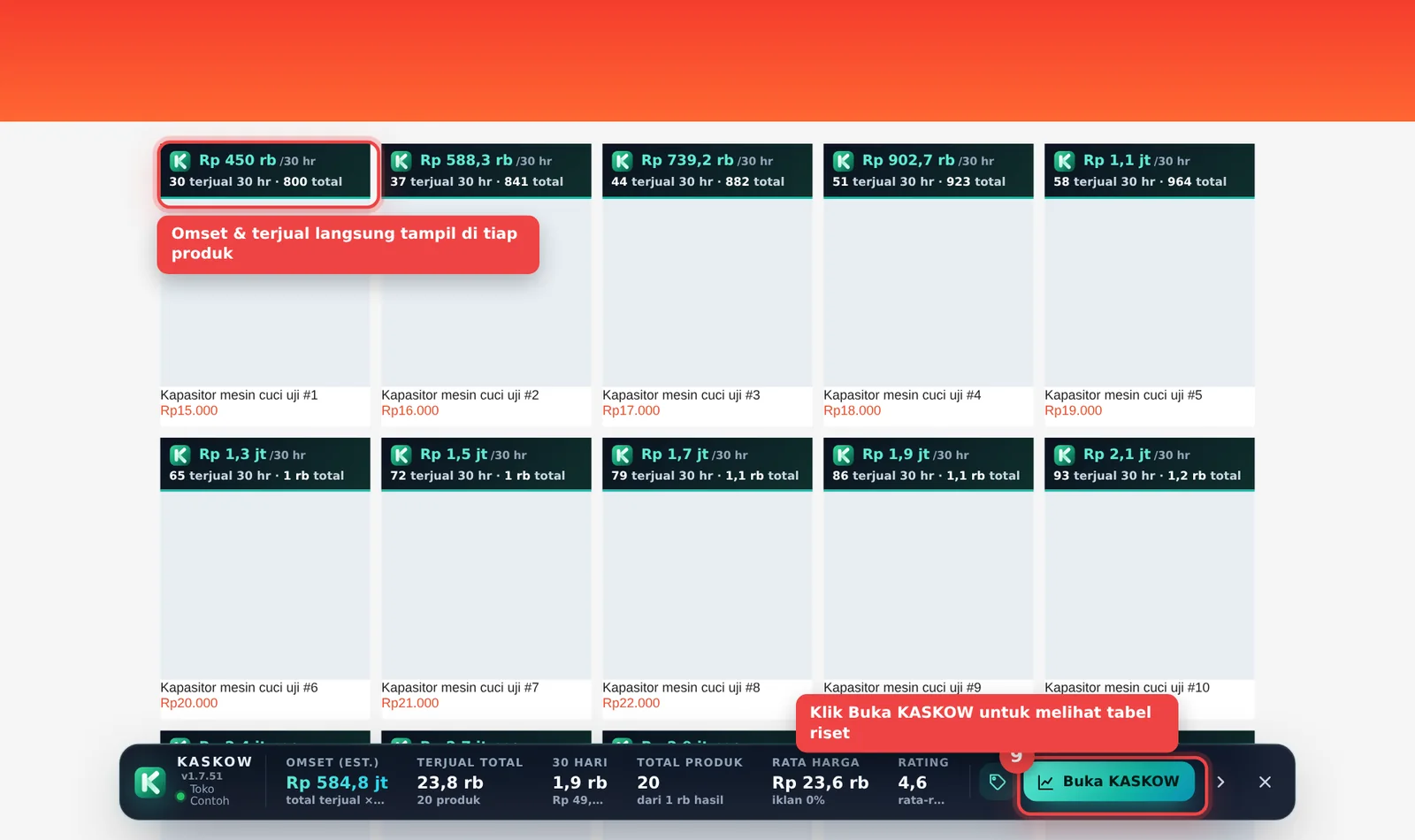
Buka shopee.co.id dan cari produk apa saja — estimasi omset dan jumlah terjual langsung tampil di setiap produk.
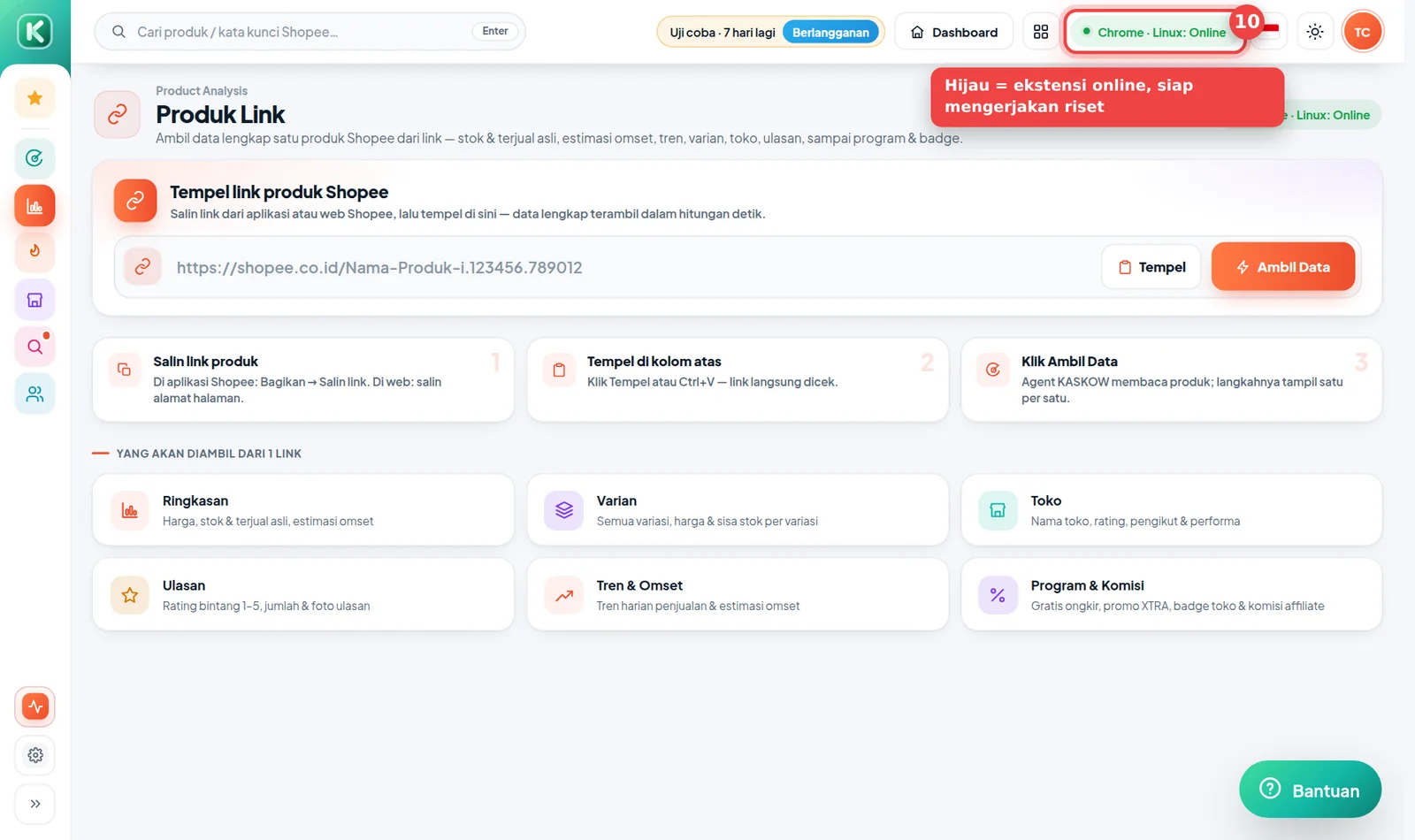
Di halaman Shopee Scraper, tombol di atas kini hijau, misalnya "Chrome · Windows: Online" — agent siap mengerjakan riset.
Riset dikerjakan oleh Chrome Anda sendiri. Selama riset atau pembaruan Monitoring berjalan, biarkan Chrome tetap terbuka (boleh dikecilkan).
Pembaruan versi
Tidak perlu melakukan apa pun. Chrome memeriksa dan memasang versi baru KASKOW secara otomatis di latar belakang — biasanya dalam beberapa jam setelah versi baru terbit.
Kalau ada kendala
| Masalah | Solusi |
|---|---|
| Tombol Tambahkan ke Chrome tidak bisa diklik | Pastikan membuka halaman di Google Chrome (bukan di HP). Di komputer kantor, pemasangan ekstensi kadang dibatasi admin jaringan — pakai cara manual ZIP. |
| Ada dua ikon KASKOW | Versi ZIP lama masih terpasang. Hapus yang lama di chrome://extensions (kartu yang bertanda Unpacked / Dibongkar). |
| Popup meminta masuk terus | Masuk dengan akun KASKOW yang sama dengan yang dipakai di kaskow.com. |
| Tidak bisa memakai Chrome Web Store sama sekali | Gunakan cara pasang manual (ZIP). |
The KASKOW extension is now officially on the Chrome Web Store. Installing takes a few clicks — no downloading files, no extracting ZIPs, no developer mode. New versions are also installed automatically by Chrome.
Pictures in this guide use sample data. Chrome may be in English or Indonesian — we name both at each step.
Before you start
- A computer or laptop with Google Chrome (Microsoft Edge and Brave can also install from the Chrome Web Store).
- A KASKOW account with an active Shopee Scraper trial or subscription. Don't have one? Activate the free 7-day trial via Telegram.
- A Shopee account signed in in the same Chrome (a regular buyer account is enough).
Installed KASKOW from a ZIP file before? Remove the old version first: open chrome://extensions, find the KASKOW card, click Remove. That way two KASKOW extensions never run at the same time.
Step 1: Open the install menu
Go to the Shopee Scraper page and click the agent method button at the top. Under Ekstensi Chrome, click the green Pasang dari Chrome Web Store (Install from Chrome Web Store) button.
You can also open the KASKOW page on the Chrome Web Store directly.
Step 2: Add to Chrome
The Chrome Web Store page opens. Check that the name is KASKOW: Riset Produk & Biaya Penjual by kaskow.com, then click the blue Add to Chrome button at the top right.
Chrome shows a confirmation window listing the extension's permissions. Click Add extension. Within seconds a notice confirms KASKOW was added.
Step 3: Pin the KASKOW icon
- Click the puzzle 🧩 (Extensions) icon at the top right of Chrome.
- Find KASKOW: Riset Produk & Biaya Penjual and click the pin 📌 next to it.
- The green K KASKOW icon now always shows in the toolbar.
Step 4: Sign in to KASKOW
Click the K KASKOW icon. Enter your KASKOW email or username and password, then click Masuk (Sign in).
Signed up with Google (no password)? Choose the Scan QR tab, scan the code with a phone signed in to KASKOW, then tap Hubungkan (Connect).
Step 5: Make sure it says "Connected"
The popup shows your account, active plan, and a Terhubung (Connected) status with a green dot.
Open shopee.co.id and search for anything — estimated revenue and sold counts appear on every product.
On the Shopee Scraper page, the top button is now green, e.g. "Chrome · Windows: Online" — the agent is ready to research.
Research runs in your own Chrome. While research or Monitoring updates run, keep Chrome open (minimised is fine).
Updates
Nothing to do. Chrome checks for and installs new KASKOW versions automatically in the background — usually within a few hours of release.
Troubleshooting
| Problem | Fix |
|---|---|
| Add to Chrome can't be clicked | Make sure you're in Google Chrome (not on a phone). On office computers, extension installs are sometimes blocked by the network admin — use the manual ZIP method. |
| Two KASKOW icons | The old ZIP version is still installed. Remove it in chrome://extensions (the card marked Unpacked). |
| The popup keeps asking to sign in | Sign in with the same KASKOW account you use on kaskow.com. |
| Can't use the Chrome Web Store at all | Use the manual install (ZIP). |