
Jualan Laris tapi Untung Tipis? Ini Rincian Biaya Shopee yang Sering Tidak TerasaSelling Well but Profit Is Thin? The Shopee Fees You Don't Notice
Harga jual Rp89.000 tapi saldo cuma masuk Rp75 ribu? Kamu tidak salah hitung — biaya Shopee memang berlapis. Ini rinciannya satu per satu, contoh hitungan lengkap, dan cara tahu harga jual yang aman.
Sold for Rp89,000 but only Rp75,000 reached your balance? You didn't miscalculate — Shopee fees are layered. Here's every fee explained, a full worked example, and how to find a safe selling price.
Di halaman ini
- Kenapa biaya Shopee terasa membingungkan?
- Rincian biaya Shopee yang perlu kamu tahu
- 1. Biaya Administrasi (wajib)
- 2. Biaya Proses Pesanan (wajib)
- 3. Biaya Pembayaran (khusus Mall)
- 4. Gratis Ongkir XTRA (program)
- 5. Promo XTRA / Promo XTRA+ (program)
- 6. PPh 22 sebesar 0,5% (wajib, dengan pengecualian)
- 7. Biaya lain yang kadang muncul
- 8. Biayamu sendiri (di luar Shopee)
- Contoh hitungan: harga jual Rp89.000, untungnya berapa?
- Kalau dikali sebulan, terasa sekali
- 6 kesalahan yang diam-diam menggerus untung
- Jadi, harga jual yang aman berapa?
- Solusinya: hitung otomatis dengan Kalkulator Untung Marketplace
- Jualan juga di TikTok Shop? Bandingkan sekalian
- Nyaman dipakai dari HP
- Checklist sebelum memasang harga
- Pertanyaan yang sering muncul
- Kesimpulan
- Why do Shopee fees feel so confusing?
- The Shopee fees you need to know
- 1. Admin fee (mandatory)
- 2. Order processing fee (mandatory)
- 3. Payment fee (Mall only)
- 4. Free Shipping XTRA (programme)
- 5. Promo XTRA / Promo XTRA+ (programme)
- 6. 0.5% PPh 22 (mandatory, with exceptions)
- 7. Other fees that sometimes apply
- 8. Your own costs (outside Shopee)
- Example: selling at Rp89,000 — what's the profit?
- Multiply it by a month and you'll feel it
- 6 mistakes that quietly eat your profit
- So what's a safe selling price?
- The solution: calculate it automatically with the Marketplace Profit Calculator
- Also selling on TikTok Shop? Compare both
- Comfortable on your phone
- Checklist before setting a price
- Frequently asked questions
- Conclusion
Pesanan masuk, barang dikirim, pembeli sudah konfirmasi. Tapi waktu saldo cair, angkanya lebih kecil dari yang kamu bayangkan. Harga jual Rp89.000, yang masuk cuma sekitar Rp75 ribu. Lalu setelah dikurangi modal, kemasan, dan iklan, untungnya tinggal belasan ribu.
Kalau kamu pernah merasa "jualan kok rame, tapi uangnya nggak kerasa" — perasaanmu itu benar. Bukan karena kamu tidak bisa berhitung. Biaya marketplace memang berlapis: sebagian dihitung persen, sebagian rupiah tetap per pesanan, sebagian tergantung kategori dan program yang kamu ikuti, dan tarifnya beberapa kali berubah dalam setahun. Wajar kalau sulit dihitung di kepala.
Artikel ini membongkar biaya Shopee satu per satu dengan bahasa sederhana, memberi contoh hitungan lengkap, lalu menunjukkan cara menghitungnya otomatis supaya harga jualmu tidak lagi pakai perkiraan.
angka tarif di artikel ini mengacu pada informasi resmi Shopee per Oktober 2026 dan contoh hitungannya adalah ilustrasi. Tarif bisa berubah sewaktu-waktu — selalu cocokkan dengan Seller Centre dan Rincian Penghasilan di tokomu.
Kenapa biaya Shopee terasa membingungkan?
Ada beberapa alasan kenapa banyak penjual merasa "kecolongan", padahal sudah merasa menghitung:
- Potongannya tidak satu. Ada biaya administrasi, biaya proses pesanan, biaya program, pajak — masing-masing dengan cara hitung berbeda.
- Tarifnya beda per kategori. Jualan skincare, baju, dan aksesoris HP bisa kena persentase yang berbeda.
- Tipe toko berpengaruh. Toko biasa (Non-Star), Star, Star+, dan Mall punya aturan yang tidak sama.
- Ada biaya yang baru muncul. Misalnya PPh 22 sebesar 0,5% yang mulai dipotong sejak 1 Oktober 2026, dan tarif Gratis Ongkir XTRA yang naik sejak Mei 2026. Hitunganmu tahun lalu bisa jadi sudah tidak berlaku.
- Biaya di luar Shopee sering terlupa. Kemasan, iklan, dan voucher toko tidak muncul di rincian potongan, tapi tetap mengurangi untungmu.
Jadi kalau selama ini kamu merasa "kok hitungan saya meleset terus", itu bukan salahmu. Sistemnya memang tidak sederhana.
Rincian biaya Shopee yang perlu kamu tahu
Supaya mudah, bagi biaya menjadi tiga kelompok: biaya wajib, biaya program (karena kamu ikut program tertentu), dan biayamu sendiri (di luar Shopee).
1. Biaya Administrasi (wajib)
Dipotong dalam persen dari harga jual setiap barang yang terjual. Besarnya tergantung kategori produk dan tipe toko. Per Oktober 2026 kisarannya sekitar 2,5% sampai 10% untuk toko biasa, dan bisa lebih tinggi untuk toko Mall. Inilah biaya yang paling sering dikira "satu-satunya", padahal baru permulaan.
2. Biaya Proses Pesanan (wajib)
Biaya tetap per pesanan, saat ini Rp1.250. Kelihatannya kecil, tapi untuk produk murah dampaknya besar: pada produk seharga Rp15.000, biaya ini saja sudah lebih dari 8% harga jual.
3. Biaya Pembayaran (khusus Mall)
Toko Mall dikenai biaya layanan pembayaran 1,8% dengan batas maksimal per barang.
4. Gratis Ongkir XTRA (program)
Kalau tokomu ikut program ini, ada potongan persen dari harga jual sesuai tier kategori produkmu, dengan batas maksimal per barang. Ukuran paket (biasa atau besar) juga ikut menentukan. Program ini membantu menarik pembeli, tapi sering jadi potongan terbesar kedua setelah biaya administrasi.
5. Promo XTRA / Promo XTRA+ (program)
Program cashback/voucher dari Shopee dengan potongan tambahan 4,5% (Promo XTRA) atau 6,5% (Promo XTRA+), masing-masing dengan batas maksimal per barang.
6. PPh 22 sebesar 0,5% (wajib, dengan pengecualian)
Sejak 1 Oktober 2026, marketplace memungut PPh 22 sebesar 0,5% dari penjualan. Penjual dengan omzet setahun sampai Rp500 juta bisa tidak dipotong bila sudah menyampaikan pernyataan omzet sesuai ketentuan — cek panduannya di Seller Centre.
7. Biaya lain yang kadang muncul
- Pre-order: tambahan 3% untuk produk dengan masa kirim pre-order.
- Komisi afiliasi: bila produkmu dipromosikan affiliate, persentase komisinya ikut dipotong.
8. Biayamu sendiri (di luar Shopee)
Ini yang paling sering tidak dihitung:
- Modal/HPP per barang.
- Kemasan: plastik, bubble wrap, kardus, stiker, kartu ucapan.
- Voucher atau diskon toko yang kamu tanggung sendiri — ini juga menurunkan dasar perhitungan.
- Ongkir yang kamu tanggung (misalnya promo gratis ongkir dari toko).
- Iklan: biasanya dihitung dari omzet, bukan dari untung.
Contoh hitungan: harga jual Rp89.000, untungnya berapa?
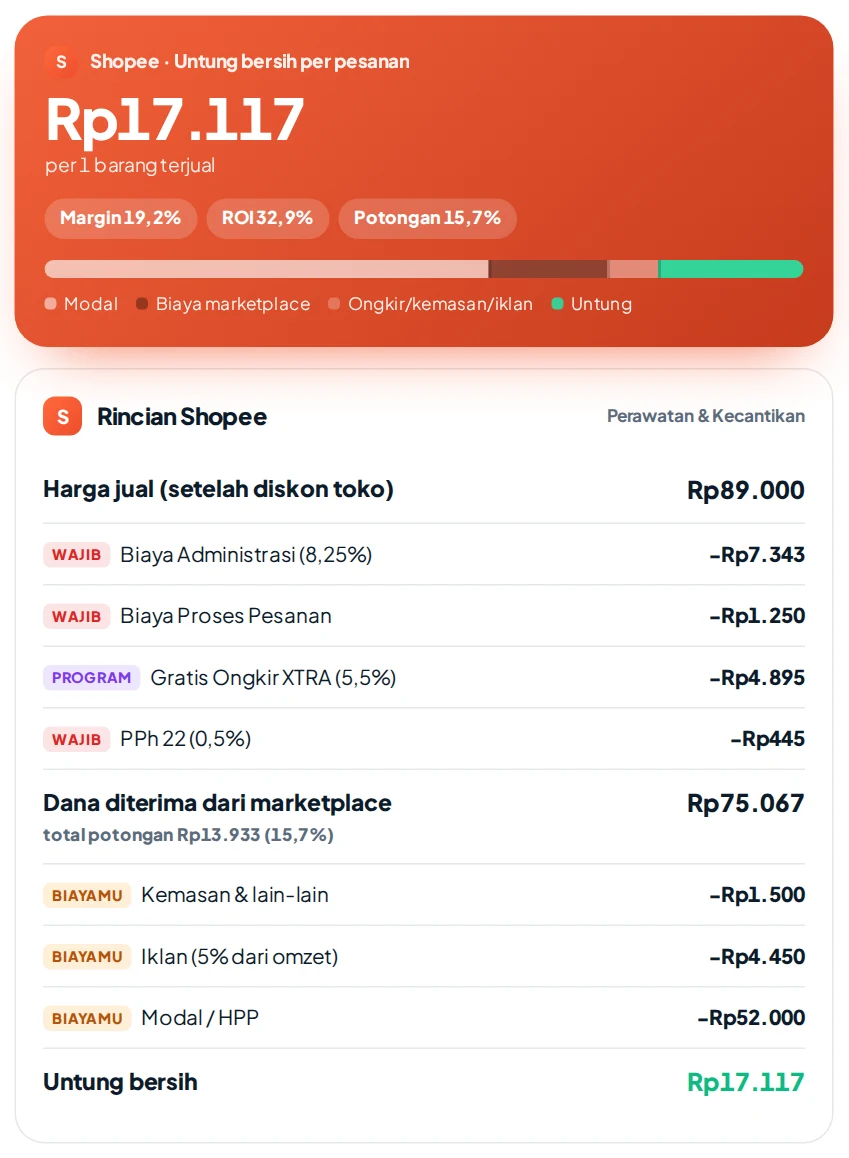
Ambil contoh penjual produk Perawatan & Kecantikan, toko biasa (Non-Star), ikut Gratis Ongkir XTRA, tidak ikut Promo XTRA, modal Rp52.000, kemasan Rp1.500, dan iklan sekitar 5% dari omzet. (Ilustrasi — tarif mengikuti data Oktober 2026.)
| Komponen | Hitungan | Jumlah |
|---|---|---|
| Harga jual | Rp89.000 | |
| Biaya Administrasi | 8,25% × Rp89.000 | −Rp7.343 |
| Biaya Proses Pesanan | per pesanan | −Rp1.250 |
| Gratis Ongkir XTRA | 5,5% × Rp89.000 | −Rp4.895 |
| PPh 22 | 0,5% × Rp89.000 | −Rp445 |
| Dana diterima dari Shopee | potongan 15,7% | Rp75.067 |
| Kemasan | −Rp1.500 | |
| Iklan | 5% × Rp89.000 | −Rp4.450 |
| Modal/HPP | −Rp52.000 | |
| Untung bersih | margin 19,2% | Rp17.117 |
Dari Rp89.000, hampir Rp14 ribu sudah terpotong sebelum uangnya sampai ke saldo. Ditambah biaya kemasan dan iklan, untung bersihnya tinggal sekitar Rp17 ribu — jauh dari selisih "Rp89.000 − Rp52.000 = Rp37.000" yang sering kita hitung di kepala.
Kalau dikali sebulan, terasa sekali
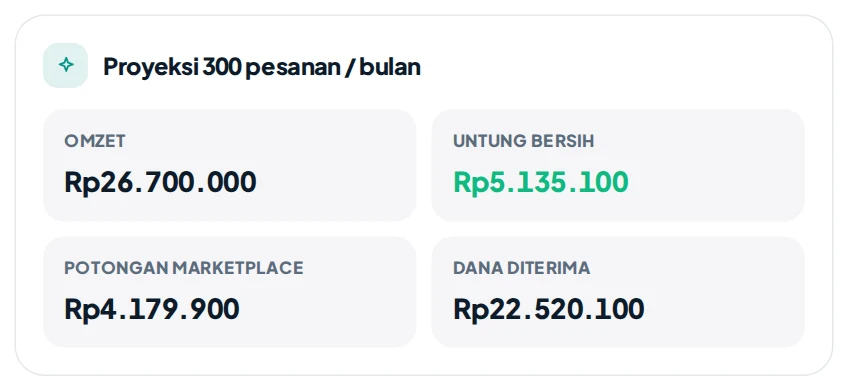
Dengan 300 pesanan sebulan, omzetnya Rp26,7 juta. Tapi sekitar Rp4,2 juta habis untuk potongan marketplace, dan untung bersih yang benar-benar kamu bawa pulang sekitar Rp5,1 juta. Inilah kenapa omzet terasa besar, tapi uangnya tidak terasa.
6 kesalahan yang diam-diam menggerus untung
- Hanya menghitung biaya administrasi. Padahal biaya proses pesanan, program, dan pajak ikut dipotong.
- Menyamakan semua kategori. Produk di kategori berbeda bisa kena tarif berbeda, jadi harga yang aman untuk satu produk belum tentu aman untuk produk lain.
- Ikut program tanpa menyesuaikan harga. Gratis Ongkir XTRA dan Promo XTRA memang mendongkrak penjualan, tapi kalau harga tidak disesuaikan, untungnya bisa tergerus habis.
- Lupa biaya tetap per pesanan pada produk murah. Rp1.250 per pesanan terasa ringan untuk barang Rp200 ribu, tapi berat untuk barang Rp15 ribu. Menjual dalam paket (bundling) bisa membantu.
- Memberi diskon dari untung, bukan dari harga. Diskon toko menurunkan harga jual, dan persentase biaya tetap dihitung dari harga — jadi untungmu turun lebih dalam dari besar diskonnya.
- Tidak memperbarui hitungan. Tarif berubah beberapa kali dalam setahun. Hitungan dari spreadsheet lama bisa sudah tidak sesuai.
buka Rincian Penghasilan salah satu pesanan di Seller Centre atau aplikasi Shopee, lalu bandingkan dengan hitunganmu. Kalau selisihnya besar, berarti ada biaya yang terlewat.
Jadi, harga jual yang aman berapa?
Pertanyaan yang lebih penting daripada "berapa potongannya" adalah: berapa harga minimal supaya saya tidak rugi, dan berapa harga supaya untungnya sesuai target?
Cara berpikirnya: karena sebagian besar biaya dihitung dari harga jual, harga minimal bukan sekadar "modal + sedikit". Rumus kasarnya:
Harga minimal = (modal + biaya tetap per pesanan + kemasan) ÷ (1 − total persen potongan − persen iklan)
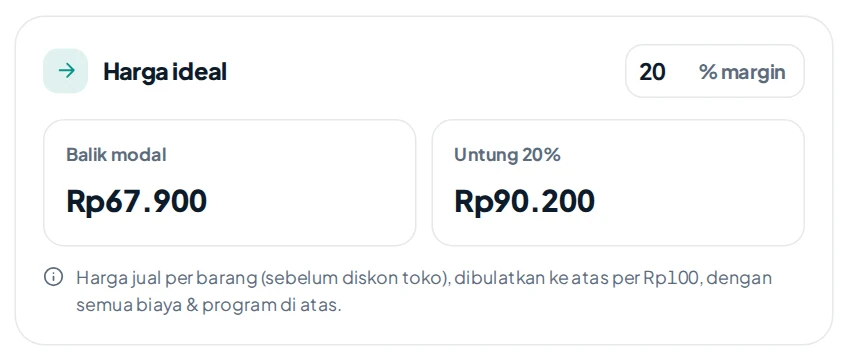
Pada contoh di atas, harga balik modal sekitar Rp67.900, sedangkan untuk untung 20% harganya sekitar Rp90.200. Artinya harga Rp89.000 sebenarnya sedikit di bawah target 20%.
Menghitung rumus ini manual untuk setiap produk, setiap kategori, dan setiap kali ikut program jelas melelahkan. Di sinilah alat bantu hitung jadi berguna.
Solusinya: hitung otomatis dengan Kalkulator Untung Marketplace
Supaya tidak perlu lagi menebak-nebak, KASKOW menyediakan Kalkulator Untung Marketplace — gratis, tanpa akun, dan bisa dipakai langsung dari browser. Semua gambar di artikel ini diambil dari kalkulator tersebut.
Yang bisa kamu lakukan:
- Tahu untung bersih per pesanan dalam hitungan detik. Cukup isi harga jual dan modal, rincian potongannya langsung muncul — mana yang wajib, mana dari program, dan mana biayamu sendiri.
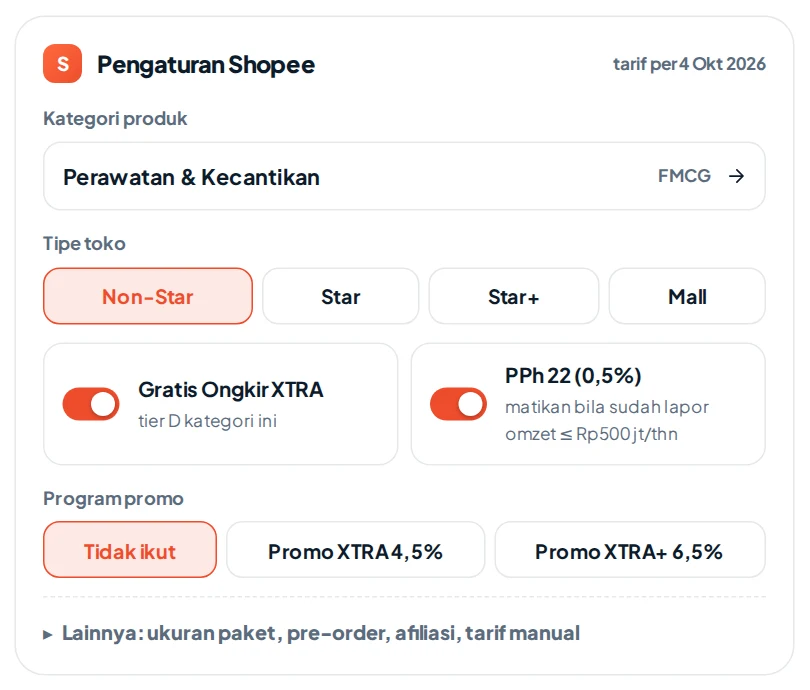
- Pilih kategori produk dan tipe toko. Tarif biaya administrasi menyesuaikan kategori dan tipe toko (Non-Star, Star, Star+, Mall), lengkap dengan Gratis Ongkir XTRA sesuai tier kategorinya.
- Coba-coba program tanpa risiko. Nyalakan atau matikan Gratis Ongkir XTRA, Promo XTRA/XTRA+, PPh 22, pre-order, dan komisi afiliasi, lalu lihat dampaknya ke untung.
- Dapatkan harga ideal. Tulis target untung (misalnya 20%), harga balik modal dan harga yang disarankan langsung muncul.
- Lihat proyeksi bulanan. Masukkan perkiraan jumlah pesanan per bulan untuk melihat omzet, total potongan, dan untung bersihmu.
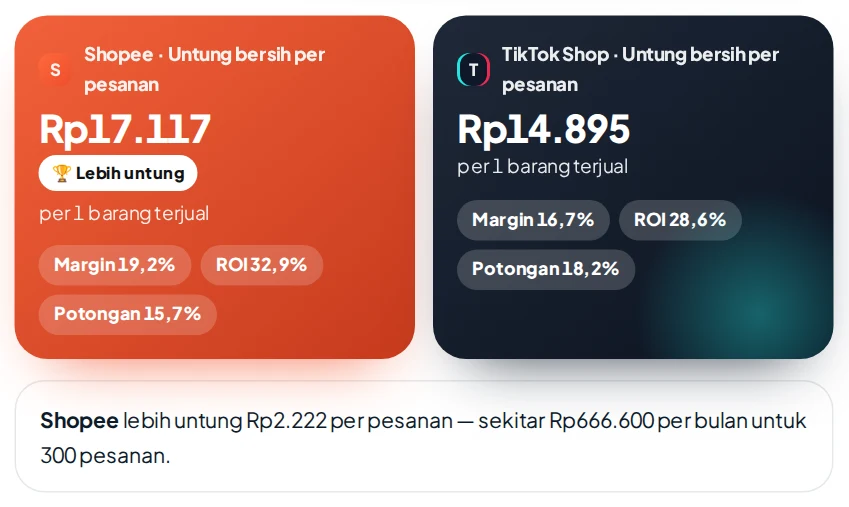
Jualan juga di TikTok Shop? Bandingkan sekalian
Kalkulator yang sama juga menghitung biaya TikTok Shop (komisi dinamis per kategori, komisi platform, Growth Xtra, dan biaya lainnya). Pilih Bandingkan untuk melihat platform mana yang memberi untung lebih besar untuk produk yang sama — lengkap dengan selisihnya per bulan.
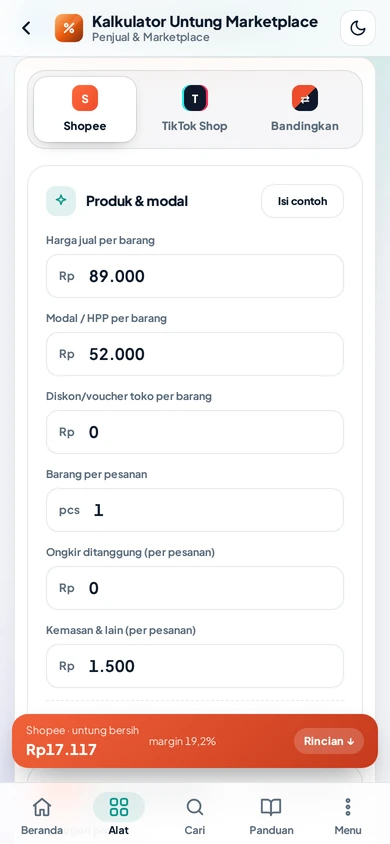
Nyaman dipakai dari HP
Sedang di gudang atau di jalan? Kalkulator ini nyaman dipakai di HP, dan untung bersihnya selalu terlihat di bagian bawah layar saat kamu mengubah angka.
Checklist sebelum memasang harga
- ✅ Sudah tahu kategori produk dan tipe tokomu.
- ✅ Sudah menghitung biaya administrasi dan biaya proses pesanan.
- ✅ Sudah memasukkan program yang kamu ikuti (Gratis Ongkir XTRA, Promo XTRA).
- ✅ Sudah memperhitungkan PPh 22 (atau sudah mengurus pengecualiannya).
- ✅ Sudah memasukkan kemasan, voucher toko, ongkir yang ditanggung, dan iklan.
- ✅ Harga jual minimal di atas harga balik modal, idealnya sesuai target untung.
- ✅ Sudah dicocokkan dengan Rincian Penghasilan di Seller Centre.
Pertanyaan yang sering muncul
Apakah biaya administrasi sama untuk semua produk?
Tidak. Besarnya tergantung kategori produk dan tipe toko. Karena itu, pilih kategori yang paling sesuai saat menghitung.
Apakah Gratis Ongkir XTRA wajib?
Tidak wajib, tapi banyak penjual ikut karena membantu penjualan. Hitung dulu dampaknya ke untung sebelum memutuskan.
Kenapa hitungan kalkulator sedikit berbeda dengan saldo yang masuk?
Bisa karena pembulatan, voucher yang dipakai pembeli, subkategori produk, atau perubahan tarif terbaru. Kalkulator memberi estimasi; angka final tetap mengikuti Rincian Penghasilan di tokomu.
Apakah harus bayar atau daftar untuk memakai kalkulatornya?
Tidak. Kalkulator Untung Marketplace gratis dan bisa dipakai tanpa akun.
Kesimpulan
Kalau kamu merasa jualan sudah ramai tapi untungnya tipis, kemungkinan besar kamu tidak salah — potongannya memang banyak dan berlapis. Kuncinya bukan berhenti ikut program atau menaikkan harga sembarangan, melainkan tahu angka pastinya sebelum memasang harga.
Mulai sekarang, sebelum memasang atau mengubah harga, hitung dulu di Kalkulator Untung Marketplace. Butuh satu menit, dan kamu bisa jualan dengan tenang karena tahu persis berapa yang kamu bawa pulang dari setiap pesanan.
The order comes in, you ship it, and the buyer confirms. But when the balance is released, the number is smaller than you expected. You sold for Rp89,000, yet only about Rp75,000 arrives. After product cost, packaging, and ads, the profit is just a few thousand rupiah.
If you have ever felt "I'm selling a lot, but the money doesn't show up" — you're right to feel that way. It isn't because you can't do the maths. Marketplace fees are layered: some are percentages, some are a fixed amount per order, some depend on your category and the programmes you join, and rates change several times a year. It is genuinely hard to work out in your head.
This article breaks down Shopee fees one by one in plain language, walks through a complete example, then shows how to calculate it automatically so your price is no longer a guess.
the rates in this article follow Shopee's official information as of October 2026, and the worked example is an illustration. Rates can change at any time — always check them against Seller Centre and the income breakdown in your shop.
Why do Shopee fees feel so confusing?
There are several reasons sellers feel "short-changed" even after doing their sums:
- There isn't just one fee. There's an admin fee, an order processing fee, programme fees, and tax — each calculated differently.
- Rates differ by category. Skincare, clothing, and phone accessories can each have a different percentage.
- Shop type matters. Regular (Non-Star), Star, Star+, and Mall shops follow different rules.
- New fees appear. For example, the 0.5% PPh 22 income tax withheld since 1 October 2026, and Free Shipping XTRA rates that rose in May 2026. Last year's calculation may no longer apply.
- Costs outside Shopee are easy to forget. Packaging, ads, and shop vouchers don't appear in the fee breakdown, but they still reduce your profit.
So if your numbers always seem a little off, it's not your fault. The system simply isn't simple.
The Shopee fees you need to know
To keep it simple, split fees into three groups: mandatory fees, programme fees (because you joined a programme), and your own costs (outside Shopee).
1. Admin fee (mandatory)
Charged as a percentage of the selling price of every item sold. The rate depends on the product category and shop type. As of October 2026 it ranges from roughly 2.5% to 10% for regular shops, and can be higher for Mall shops. This is the fee most people assume is "the only one", but it's just the start.
2. Order processing fee (mandatory)
A fixed fee per order, currently Rp1,250. It looks small, but it hits cheap products hard: on a Rp15,000 item, this fee alone is more than 8% of the price.
3. Payment fee (Mall only)
Mall shops pay a 1.8% payment service fee, capped per item.
4. Free Shipping XTRA (programme)
If your shop joins this programme, a percentage of the selling price is charged based on your product's category tier, capped per item. Parcel size (regular or large) also matters. It helps attract buyers, but it is often the second-largest deduction after the admin fee.
5. Promo XTRA / Promo XTRA+ (programme)
Shopee's cashback/voucher programme with an extra 4.5% (Promo XTRA) or 6.5% (Promo XTRA+), each capped per item.
6. 0.5% PPh 22 (mandatory, with exceptions)
Since 1 October 2026, marketplaces withhold 0.5% PPh 22 income tax on sales. Sellers with annual turnover up to Rp500 million may be exempt after submitting a turnover declaration as required — check the guide in Seller Centre.
7. Other fees that sometimes apply
- Pre-order: an extra 3% for products with a pre-order shipping time.
- Affiliate commission: if affiliates promote your product, their commission is deducted too.
8. Your own costs (outside Shopee)
These are the ones most often left out:
- Product cost per item.
- Packaging: plastic, bubble wrap, boxes, stickers, thank-you cards.
- Shop vouchers or discounts you fund yourself — these also lower the base used for fees.
- Shipping you cover (for example your own free-shipping promo).
- Ads: usually measured against sales, not profit.
Example: selling at Rp89,000 — what's the profit?
Take a seller in Beauty & Personal Care, a regular (Non-Star) shop, in Free Shipping XTRA, not in Promo XTRA, with a product cost of Rp52,000, packaging of Rp1,500, and ads of about 5% of sales. (Illustration — rates as of October 2026.)
| Item | Calculation | Amount |
|---|---|---|
| Selling price | Rp89,000 | |
| Admin fee | 8.25% × Rp89,000 | −Rp7,343 |
| Order processing fee | per order | −Rp1,250 |
| Free Shipping XTRA | 5.5% × Rp89,000 | −Rp4,895 |
| PPh 22 | 0.5% × Rp89,000 | −Rp445 |
| Payout from Shopee | 15.7% in fees | Rp75,067 |
| Packaging | −Rp1,500 | |
| Ads | 5% × Rp89,000 | −Rp4,450 |
| Product cost | −Rp52,000 | |
| Net profit | 19.2% margin | Rp17,117 |
Out of Rp89,000, almost Rp14,000 is deducted before the money even reaches your balance. Add packaging and ads, and net profit is about Rp17,000 — far from the "Rp89,000 − Rp52,000 = Rp37,000" we often calculate in our heads.
Multiply it by a month and you'll feel it
With 300 orders a month, sales reach Rp26.7 million. But about Rp4.2 million goes to marketplace fees, and the net profit you actually take home is about Rp5.1 million. That's why sales feel big while the money doesn't.
6 mistakes that quietly eat your profit
- Counting only the admin fee. Order processing, programme fees, and tax are deducted too.
- Treating every category the same. Different categories can have different rates, so a safe price for one product may not be safe for another.
- Joining programmes without adjusting your price. Free Shipping XTRA and Promo XTRA do lift sales, but without a price adjustment they can wipe out your profit.
- Forgetting the fixed per-order fee on cheap products. Rp1,250 per order is light on a Rp200,000 item but heavy on a Rp15,000 one. Selling in bundles can help.
- Discounting from profit instead of price. A shop discount lowers the selling price, while percentage fees still apply — so your profit drops further than the discount itself.
- Never updating your numbers. Rates change several times a year. An old spreadsheet may already be out of date.
open the income breakdown of one order in Seller Centre or the Shopee app and compare it with your own calculation. A large gap means a fee is missing.
So what's a safe selling price?
The more important question isn't "how much is deducted", but: what's the minimum price so I don't lose money, and what price hits my profit target?
Because most fees are a percentage of the selling price, the minimum price isn't simply "cost + a little". The rough formula:
Minimum price = (product cost + fixed per-order fees + packaging) ÷ (1 − total fee percentage − ad percentage)
In the example above, the break-even price is about Rp67,900, while a 20% margin needs about Rp90,200. In other words, Rp89,000 is actually slightly below a 20% target.
Working this out by hand for every product, every category, and every programme is exhausting. That's where a calculator helps.
The solution: calculate it automatically with the Marketplace Profit Calculator
So you can stop guessing, KASKOW offers the Marketplace Profit Calculator — free, no account, right in your browser. Every image in this article was taken from it.
What you can do:
- See net profit per order in seconds. Enter the selling price and cost, and the fee breakdown appears instantly — what's mandatory, what comes from programmes, and what's your own cost.
- Pick your product category and shop type. The admin fee follows the category and shop type (Non-Star, Star, Star+, Mall), with Free Shipping XTRA by category tier.
- Try programmes risk-free. Toggle Free Shipping XTRA, Promo XTRA/XTRA+, PPh 22, pre-order, and affiliate commission to see the effect on profit.
- Get an ideal price. Enter a target margin (say 20%) to see the break-even and suggested price.
- See a monthly projection. Enter your expected orders per month to see sales, total fees, and net profit.
Also selling on TikTok Shop? Compare both
The same calculator also covers TikTok Shop fees (dynamic commission by category, platform commission, Growth Xtra, and other fees). Choose Compare to see which platform earns more for the same product — including the monthly difference.
Comfortable on your phone
In the warehouse or on the go? The calculator works well on phones, and your net profit stays visible at the bottom of the screen as you change the numbers.
Checklist before setting a price
- ✅ You know your product category and shop type.
- ✅ You've included the admin fee and the order processing fee.
- ✅ You've added the programmes you're in (Free Shipping XTRA, Promo XTRA).
- ✅ You've accounted for PPh 22 (or arranged the exemption).
- ✅ You've included packaging, shop vouchers, shipping you cover, and ads.
- ✅ Your price is above break-even, ideally at your target margin.
- ✅ You've checked it against the income breakdown in Seller Centre.
Frequently asked questions
Is the admin fee the same for every product?
No. It depends on the product category and shop type, so choose the closest category when calculating.
Is Free Shipping XTRA mandatory?
No, but many sellers join because it helps sales. Calculate its effect on profit before deciding.
Why is the calculator slightly different from the balance I receive?
It can be rounding, vouchers used by the buyer, the product's sub-category, or a recent rate change. The calculator gives an estimate; the final figure follows your shop's income breakdown.
Do I have to pay or sign up to use the calculator?
No. The Marketplace Profit Calculator is free and works without an account.
Conclusion
If your shop feels busy but profit is thin, you're most likely not wrong — the deductions really are many and layered. The answer isn't to quit programmes or raise prices at random, but to know the exact numbers before you set a price.
From now on, before you set or change a price, run it through the Marketplace Profit Calculator. It takes a minute, and you can sell with confidence knowing exactly what you take home from every order.